


Many MSPs grow on custom quotes. Every client gets a slightly different mix of services, prices and promises. It works at first. Then it becomes hard to explain what you sell, hard to deliver consistently, hard to train new staff and almost impossible to market clearly online.
Standard packages fix that. Clear tiers make your services easier to buy, easier to deliver and easier to put on a website. They also protect your margins as you grow.
This guide covers the main pricing models, how to design three sensible tiers, how to set scope and service levels, the basics of margin, and how to present your packages so buyers understand them.
The short answer
Use per-user pricing as your base, with per-device charges for servers, firewalls and specialist equipment. Offer three tiers, put core security (MFA, endpoint protection, tested backups) into every one, and let higher tiers add coverage, depth and strategy. Write down exactly what is included and excluded, express SLAs as plain promises, price from your real costs and target margin, and show the tiers clearly on your website with “starting from” prices.
Why packaging is a marketing problem, not just a pricing problem
- Buyers compare before they call. If your website can’t explain what they’d get, they move on to one that does.
- Custom quotes slow sales down. Every proposal becomes a project.
- Inconsistent scope creates disputes. Clients remember what they think they bought.
- Standard packages are easier to deliver well. Same tools, same processes, fewer surprises.
- Clear tiers make upselling natural. Clients can see the next step up and why it matters.
The main MSP pricing models
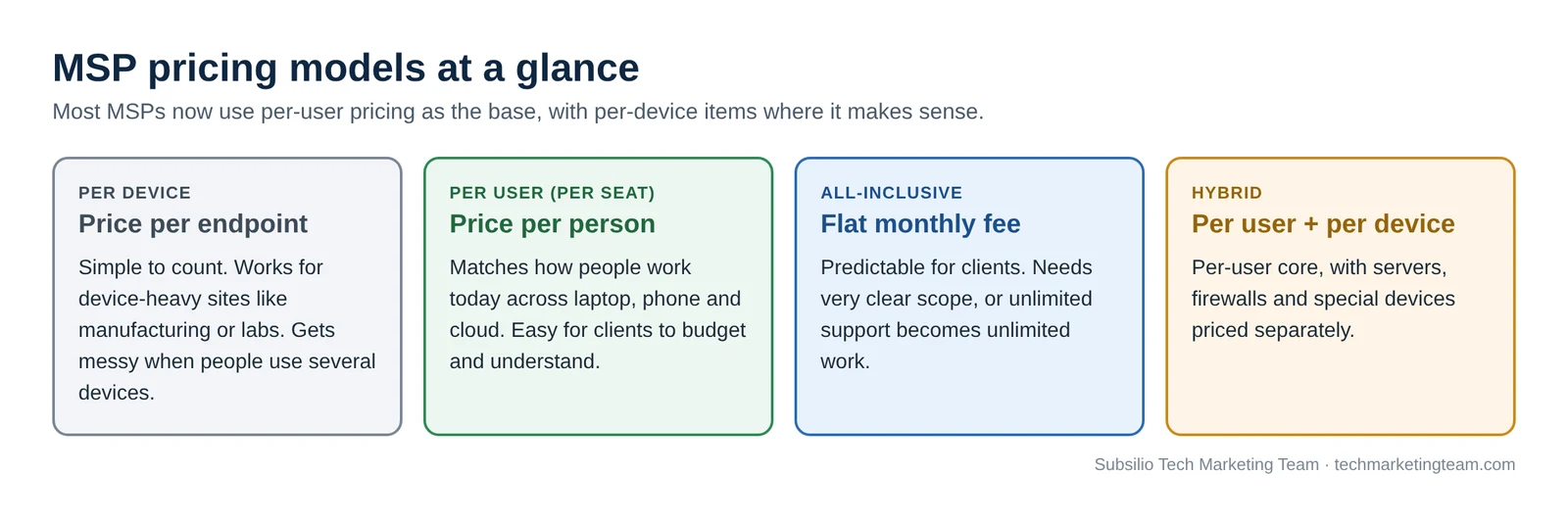
Most MSPs settle on a hybrid: per-user core services plus per-device infrastructure.
| Model | Pros | Cons | Best for |
|---|---|---|---|
| Per device | Easy to count and audit | Penalises multi-device users; harder for clients to budget | Device-heavy sites, labs, kiosks |
| Per user (per seat) | Matches modern work; simple to budget | Needs rules for shared and part-time users | Most office-based businesses |
| All-inclusive flat fee | Very predictable for the client | Scope creep if boundaries are unclear | Stable clients with clear scope |
| Hybrid | Fair and flexible | Slightly more to explain | Most MSPs, as the long-term model |
| À la carte | Easy to start | Hard to deliver consistently; weak security | Rarely recommended as the main model |
Per-user pricing has become the common default because people now work across a laptop, a phone and cloud apps. Pricing per device creates awkward conversations every time someone gets a new tablet.
Designing your tiers
Three tiers is the sweet spot. Two feels like a yes-or-no choice; four or more becomes confusing. Name tiers by what they mean to the buyer (Essentials, Business, Complete) rather than metals or technical labels.
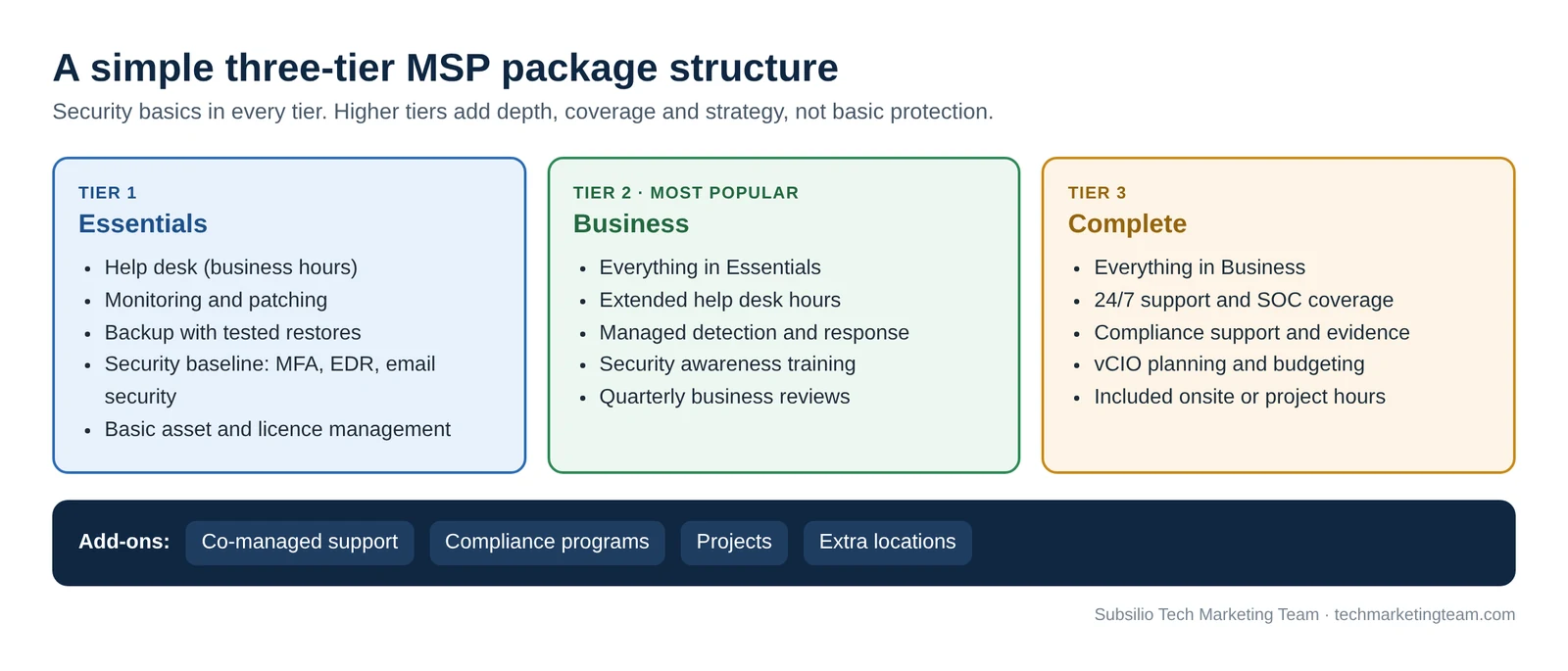
Every tier is secure. Higher tiers add coverage, depth and strategy.
Put security in every tier
Don’t make basic security optional. Selling a package without multi-factor authentication, endpoint protection and tested backups leaves your client exposed and leaves your MSP holding the risk when something goes wrong. Many cyber insurers also ask about these controls. A recognised baseline such as the CIS Controls Implementation Group 1 is a useful reference for what “essential” should mean.
Differentiate tiers by coverage and depth
- Coverage: support hours, response times, after-hours and onsite visits.
- Depth: managed detection and response, 24/7 SOC, security training.
- Strategy: quarterly reviews, vCIO planning, budgeting and roadmaps.
- Compliance: policy support, evidence collection, audit preparation.
Keep add-ons separate
Some services don’t fit neatly into tiers: co-managed support for companies with internal IT, formal compliance programs, project work and extra locations. Price them as add-ons so the core tiers stay simple.
Define scope and service levels clearly
Most client disputes come from unclear scope, not bad service. Write down what each tier includes and, just as importantly, what it doesn’t.
| Area | Make clear in writing |
|---|---|
| Support | Hours covered, channels (phone, email, portal), remote vs onsite |
| Response times | By priority, as plain promises, e.g. “Business down: we start within 30 minutes” |
| Projects | What counts as a project (new office, migration) and how it’s priced |
| Third-party software | Which line-of-business apps you support, and how far |
| Hardware | Procurement, setup and warranty handling; what’s included |
| After-hours | Included in which tiers; rates for the others |
| Users | How shared, part-time and seasonal users are counted |
For how to write these clearly on your website, see managed IT services pages that explain outcomes, not jargon.
Margin basics: price from cost, not from competitors
Your per-user price needs to cover three things: the tools you license per user, the labour each user typically needs, and your target margin. A simple way to sanity-check a price:
Simple per-user pricing check (illustration only)
Tool and licence costs per user per month: $25
Average support labour per user per month: 0.75 hours × $60 loaded cost = $45
Total cost per user: $70
Target gross margin: 50% → price = $70 ÷ (1 − 0.50) = $140 per user per month
These numbers are examples only. Use your own tool costs, ticket data and labour rates.
- Use your ticket data to see real labour per user, by client type
- Standardise your tool stack so costs per user stay predictable
- Review prices at least once a year as vendor costs change
- Watch for clients who consistently cost far more to support than their tier assumes
Saying no to poor-fit clients protects margins too. See don’t take on bad clients.
Presenting your packages on your website
Packages only help marketing if buyers can see them. A good pricing or packages page includes:
- A comparison table of the three tiers, with the most common choice highlighted
- “Starting from” prices or a clear range per user. Many MSPs hide prices; showing them builds trust and filters out poor fits.
- Who each tier is for, in one line: “For small offices that need reliable support and solid security”
- What’s always included, especially security
- Add-ons listed separately
- FAQs on contracts, onboarding and switching providers. See answer-first FAQ content.
Our high-converting websites service builds packages and pricing pages for MSPs, and our guide to MSP website architecture explains where these pages should sit on your site.
Moving existing clients onto standard tiers
- Map every current client to the tier they’re closest to.
- Identify gaps, especially clients missing core security.
- Raise it at the next quarterly review, framed around risk and value, not price. See turning QBRs into marketing assets.
- Give notice and a transition period where pricing changes.
- Decide case by case whether to keep a few legacy agreements, and set an end date for them.
Common mistakes to avoid
- Too many tiers, or tiers that differ only in name
- Making MFA, endpoint protection or backups optional
- “Unlimited support” without clear boundaries
- Pricing from competitors’ websites instead of your own costs
- Hiding all pricing, so buyers can’t shortlist you
- Never reviewing prices as costs rise
Final thoughts
Standard packages make your MSP easier to buy from, easier to run and easier to market. Use per-user pricing as the core, keep to three clear tiers with security built into each, write scope and service levels in plain language, price from your real costs, and show it all clearly online. Every other part of your marketing gets easier once buyers can see exactly what you offer.
Subsilio Tech Marketing Team helps MSPs turn their packages into clear service and pricing pages that rank and convert. Book a free strategy call to review how your services are presented today.
Frequently Asked Questions
Should an MSP charge per user or per device?
Most MSPs now charge per user for core services, because people work across several devices and cloud apps. Per-device pricing still makes sense for servers, firewalls and specialist equipment, so a hybrid model is common.
How many service tiers should an MSP offer?
Three is usually best. It gives buyers a clear choice without confusion, and lets you highlight the tier most clients choose.
What should be included in every MSP package?
Help desk support, monitoring and patching, tested backups, and a security baseline including multi-factor authentication, endpoint protection and email security.
What is all-inclusive MSP pricing?
It’s a flat monthly fee covering a defined set of services, often called “all you can eat.” It is predictable for clients, but needs very clear scope so unlimited support doesn’t become unlimited work.
Should MSPs publish their prices online?
Showing “starting from” prices or ranges usually helps. Buyers shortlist providers before they call, and clear pricing builds trust and filters out poor-fit leads.
How do you work out an MSP per-user price?
Add up tool and licence costs per user and average support labour per user, then divide by one minus your target gross margin. Check the result against your own ticket data regularly.
How do you move existing clients to new MSP packages?
Map each client to the closest tier, identify gaps such as missing security, discuss the change at a quarterly review, and give clear notice and a transition period for any price changes.