


Most MSP websites don’t fail because of bad design or thin content. They fail because of how they are organized. When your services are buried three menus deep, your service pages compete with each other for the same keywords, and a visitor can’t find a “book a call” button without hunting for it, no amount of blogging or ad spend will fix the results.
Website architecture, the way your pages are structured, linked, and organized, is the invisible layer that decides three things at once: whether Google can crawl and rank your site, whether AI search tools can understand what you actually do, and whether a business owner who lands on your site can get from “first visit” to “booked call” without friction. In our work building and rebuilding websites for MSPs and IT companies, architecture problems are the single most common issue we find on sites that get traffic but not leads.
This guide walks through exactly how MSP website architecture affects SEO rankings and lead generation, what the ideal structure looks like, and how to restructure an existing site without losing the rankings you already have. By the end, you’ll be able to audit your own site and know precisely what to fix first.
What Is Website Architecture (and Why MSPs Should Care)
Website architecture (also called site structure) is how the pages on your website are grouped, connected, and presented: your page hierarchy, your URL structure, your navigation menus, and your internal links. Think of it as the org chart of your website, with the homepage at the top, main hubs underneath it, and specific pages under each hub.
For an MSP, that hierarchy carries real business meaning. “Managed IT services,” “cybersecurity,” “cloud migration,” and “IT support for healthcare practices” are different search intents, different buyers, and often different price points. If your website lumps them onto one long “Services” page, you’re asking a single URL to rank for a dozen unrelated keywords, and it will rank for none of them well.
Good architecture solves this by giving every important service, industry, and location its own dedicated, well-linked page, arranged so that both search engines and humans can see how everything fits together.
How Website Architecture Directly Affects Your SEO Rankings
1. Crawling and indexing: Google can’t rank what it can’t find
Search engines discover your pages by following links. Pages that are many clicks deep, or only reachable through a dropdown menu or a search box, get crawled less often, and sometimes not at all. A clean hierarchy with every important page reachable within about three clicks of the homepage ensures your money pages get crawled, indexed, and refreshed regularly. An XML sitemap helps too (see Google’s sitemap documentation), but a sitemap is a supplement to good structure, not a replacement for it.
2. Link equity flows through your structure
Authority earned by any page, through backlinks, mentions, or citations, flows to other pages through internal links. A well-structured site channels that authority from the homepage and blog into the service pages that actually win clients. A disorganized site leaks it into orphan pages, duplicate URLs, and dead ends.
3. Topical authority and topic clusters
Google increasingly rewards sites that demonstrate depth on a topic, not just a single optimized page. Architecture is how you demonstrate that depth: a cybersecurity service page supported by a cluster of related guides (email security, backup and recovery, compliance basics), all interlinked, tells search engines and AI systems that your business genuinely covers this subject. This same cluster structure is one of the strongest patterns for getting cited by AI search tools, which prefer sources that cover a topic comprehensively.
4. Preventing keyword cannibalization
When two or three of your pages target the same keyword, a common problem when MSPs create overlapping pages over the years, they compete against each other and both rank lower. A deliberate architecture assigns one primary keyword theme to one page, so your own site never becomes your competitor.
5. Sitelinks and richer search listings
When a site has a clear, consistent hierarchy, Google often displays sitelinks under the main result: direct links to your services, about, and contact pages. You can’t force sitelinks with code, they’re earned through clear structure. They increase your real estate on the results page and send visitors straight to the page that matches their intent.
How Architecture Turns Rankings Into Booked Calls
Ranking is only half the job. The other half is what happens in the first 30 seconds after someone lands on your site. Typical B2B service websites convert only a low single-digit percentage of visitors into leads, which means small structural improvements to the visitor journey have an outsized effect on how many calls end up on your calendar.
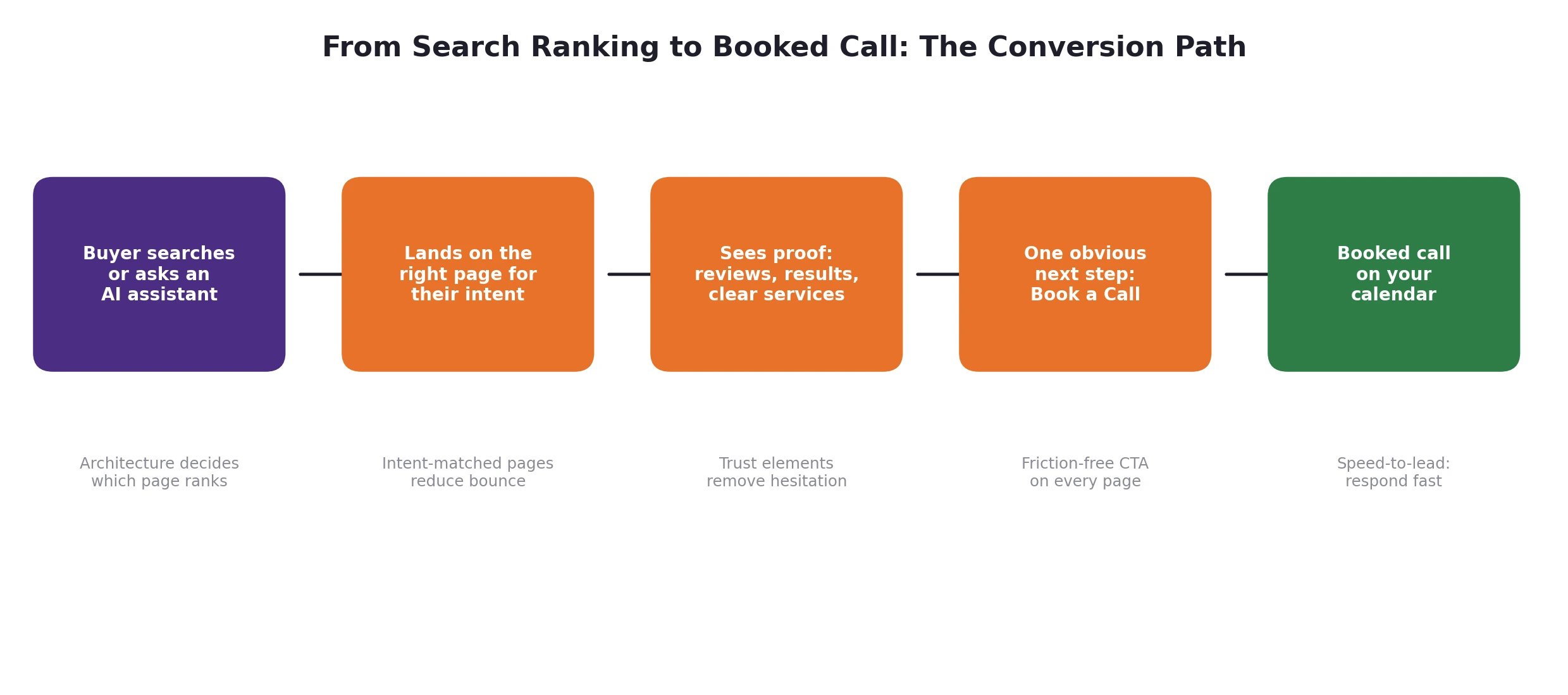
The conversion path: every architectural decision either shortens or lengthens this journey.
Architecture drives conversions in three specific ways:
- Intent matching. When each service, industry, and city has its own page, a searcher lands on a page about exactly what they searched for, not a generic homepage they have to navigate from. Relevance is the biggest single factor in whether a visitor stays or bounces.
- Shorter paths to action. If booking a call takes one click from any page, more people do it. If it takes three clicks and a form hunt, most won’t. Your structure should make “Book a Call” or “Contact Us” available from every page, especially service pages.
- Trust placement. Decision-makers evaluating an IT partner look for proof: reviews, case studies, real people, certifications. Architecture decides whether that proof sits next to your calls-to-action or is buried on a page nobody visits. Your reviews and about pages should be linked prominently from every service page, not just the footer.
The Ideal MSP Website Architecture
Here is the structure we recommend, and build, for MSPs and IT service companies. It follows a flat, hub-and-spoke model: every important page is within three clicks of the homepage, related pages are grouped into hubs, and every hub funnels toward a conversion action.
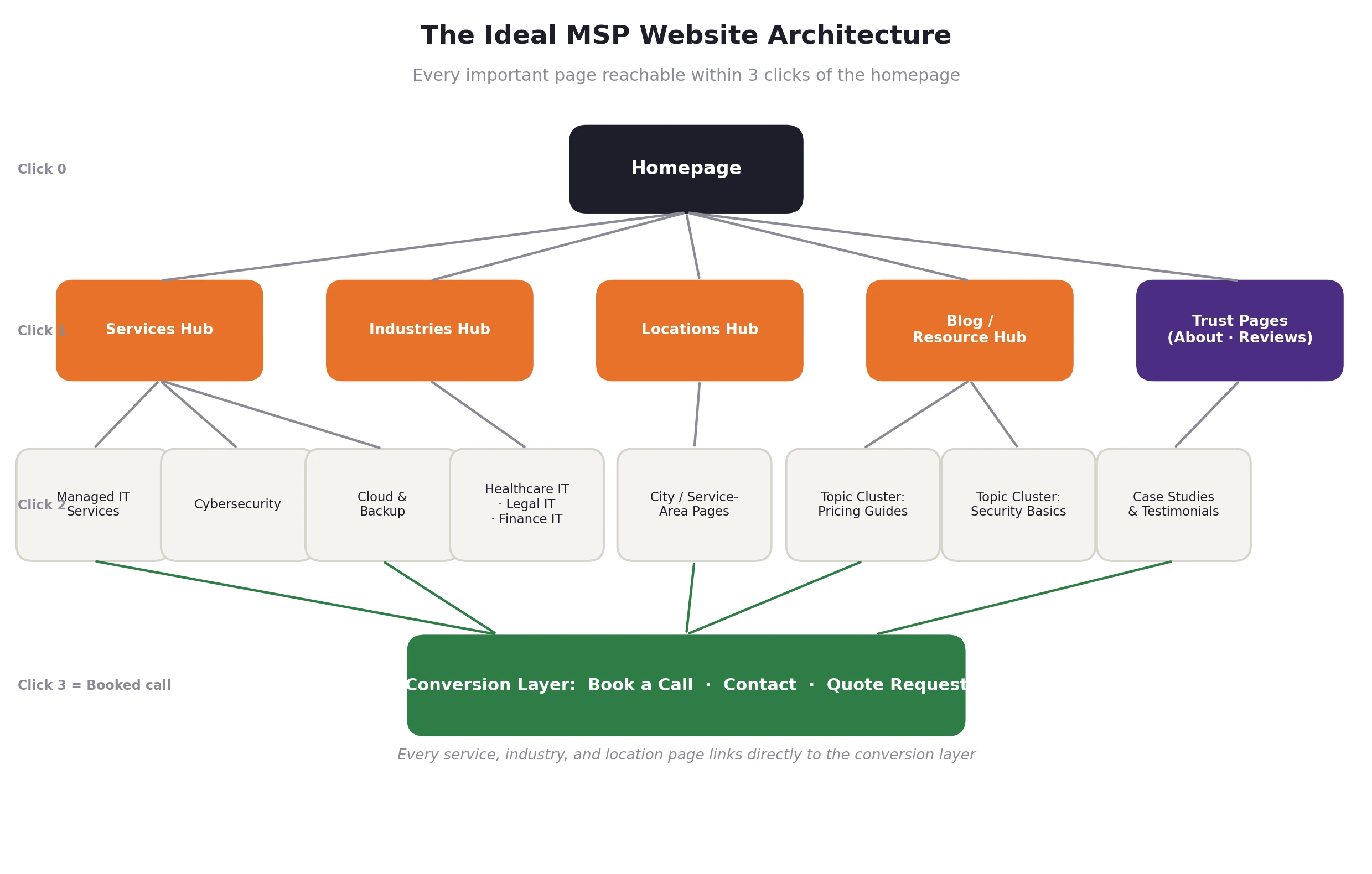
The ideal MSP website architecture: hubs for services, industries, locations, and content, all feeding a single conversion layer.
Level 1: The homepage
The homepage’s job is orientation and routing: say clearly who you help, what you do, and where you do it, then route visitors to the right hub. It should link directly to every main hub and carry a visible booking CTA above the fold. It should not try to explain every service in detail, that’s what service pages are for.
Level 2: The core hubs
- Services hub. A parent page (/services/) that briefly introduces each service and links to a dedicated child page for each one: managed IT, cybersecurity, cloud and backup, VoIP, co-managed IT, and so on. One service, one page, one primary keyword theme.
- Industries hub. MSPs that specialize win better clients. Pages like “IT support for healthcare practices” or “IT services for law firms” rank for lower-competition, higher-intent keywords and convert dramatically better because they speak the buyer’s language.
- Locations hub. If you serve specific cities or regions, dedicated location pages capture “managed IT services + city” searches. Each must contain genuinely local content: local clients, local landmarks of your service area, local contact details, not the same page with a swapped city name.
- Blog and resource hub. Your blog is where topic clusters live: educational content that earns rankings, feeds internal links to service pages, and gives AI search tools citable answers.
- Trust pages. About, reviews, case studies, and certifications. These are conversion assets, so link to them from every service page.
Level 3: The spokes
Individual service pages, individual industry pages, individual city pages, and individual blog posts. Every spoke links up to its hub, sideways to closely related spokes, and forward to the conversion layer.
The conversion layer
A contact page, an embedded scheduler, and consistent “Book a Call” CTAs across the site. This layer isn’t a single page, it’s a set of actions that should be reachable in one click from anywhere. Every service, industry, and location page should end with a clear next step, and the site header should carry a persistent booking button.
URL Structure Best Practices for MSP Sites
Your URLs should mirror your hierarchy and read like plain English. Google’s URL structure guidelines recommend simple, descriptive URLs, and they matter for users too, because a clean URL previews the page before anyone clicks.
- Use the pattern domain.com/services/managed-it-services/ so the folder path shows the relationship between pages.
- Keep URLs short, lowercase, and hyphen-separated. Include the primary keyword once, and never stuff variations into the slug.
- Avoid dates, ID numbers, and parameters in URLs for evergreen pages.
- Pick one canonical version (with or without trailing slash, www or non-www) and redirect everything else to it.
- Once a URL is live and ranking, don’t change it for cosmetic reasons. Every change requires a redirect and temporarily disrupts rankings.
Internal Linking: The Engine Inside Your Architecture
Internal links are how architecture actually works day to day. Menus define the skeleton, in-content links move authority and visitors around the body. Three rules cover most of what matters:
- Link down, up, and across. Hubs link to their spokes, spokes link back to hubs, and related spokes link to each other. A blog post about ransomware protection should link to your cybersecurity service page, and the service page should link to your best related guides.
- Use descriptive anchor text. “Managed IT services for law firms” tells search engines and readers what the destination is about. “Click here” tells them nothing. Vary the phrasing naturally, because identical anchors everywhere look manipulative.
- Send the most links to the pages that make you money. Count the internal links pointing at each of your service pages. If your privacy policy has more internal links than your cybersecurity page, your architecture is upside down.
Also audit for orphan pages, pages with no internal links pointing to them. Orphans rarely rank and almost never convert, because neither crawlers nor visitors can find them.
Navigation, Speed, and Mobile: Architecture the Visitor Feels
- Keep the main menu tight. Five to seven top-level items: services (with a dropdown to individual services), industries or locations if applicable, about, blog, contact, and a visually distinct booking button.
- Use breadcrumbs. Breadcrumb navigation shows visitors where they are and gives search engines an explicit map of your hierarchy, and it’s eligible for enhanced display in search results when paired with breadcrumb structured data.
- Make it fast. Page speed is a confirmed part of Google’s page experience signals (see Core Web Vitals), and slow pages measurably lose leads, because visitors abandon pages that make them wait. Compress images, use caching, and keep scripts lean.
- Design mobile-first. Google indexes the mobile version of your site, and a large share of B2B research now happens on phones. Buttons must be tappable, menus must work with a thumb, and your booking flow must complete cleanly on a small screen.
Architecture and AI Search: The New Reason Structure Matters
AI search tools, including AI assistants, AI-generated answer summaries, and conversational search, are now part of how businesses find IT providers. Someone asks, “Who are the best managed IT providers near me?” or “How much should managed IT cost for a 30-person company?” and an AI system assembles an answer from sources it can access, parse, and trust.
The same architecture that helps Google helps AI systems, with a few extra emphases:
- Crawlability is non-negotiable. AI crawlers must be able to fetch your pages. Aggressive firewall or bot-blocking settings that challenge automated visitors can silently make your site invisible to AI search, which is worth testing explicitly.
- One page, one clear topic. AI systems extract answers from pages that address a question directly. A focused page on “co-managed IT services” is far more citable than a paragraph about it buried in a general services page.
- Answer-shaped content. Clear headings phrased as questions, direct answers in the first sentence or two beneath them, and FAQ sections give AI systems clean, quotable blocks.
- Structured data. Schema markup makes your architecture machine-readable. It tells search engines and AI systems what your organization is, what services each page describes, and how pages relate. Google’s structured data documentation is the definitive reference, and we cover the full MSP implementation in our companion guide to MSP schema markup.
7 Architecture Mistakes We See on MSP Websites
- One mega “Services” page trying to rank for every service at once, the most common and most costly mistake.
- Duplicate or overlapping pages created over years without a plan, cannibalizing each other’s rankings.
- Orphaned content: blog posts and old landing pages with no internal links pointing to them.
- Location pages that are copy-paste clones with only the city name changed. These rarely rank and can drag down the whole site’s quality.
- No conversion layer: contact details hidden on one page, no persistent booking CTA, forms with ten required fields.
- Deep click paths, with key pages four, five, or six clicks from the homepage, invisible to crawlers and visitors alike.
- Navigation built around the org chart, not the buyer, with menus labeled using internal jargon instead of the words prospects actually search for.
How to Restructure an Existing MSP Website Without Losing Rankings
If your site already has rankings and backlinks, restructure carefully. This is the sequence we follow:
- Audit what exists. Crawl the site, export every URL, and map each page’s traffic, rankings, backlinks, and internal links. Identify duplicates, orphans, and cannibalization.
- Design the target structure first. Draw the full hierarchy, hubs, spokes, and URLs, before touching anything live. Decide which existing pages map to which new URLs, which get merged, and which get retired.
- Write the redirect map. Every old URL that changes or disappears gets a 301 redirect to its closest new equivalent, one hop, no chains. This preserves the authority those URLs have earned.
- Rebuild internal links. Update navigation, breadcrumbs, and in-content links to point at the new URLs directly rather than through redirects.
- Launch, submit, monitor. Update the XML sitemap, submit it in Google Search Console, and watch indexing, rankings, and 404 reports closely for 4 to 8 weeks. Expect some fluctuation, because sustained losses usually trace back to a missed redirect or a de-linked page.
Restructuring is one of the highest-leverage SEO projects an MSP can run, and one of the easiest to get wrong. If you’d rather not gamble with existing rankings, this is exactly the kind of project our SEO team handles alongside our website design and rebuild work.
Conclusion: Fix the Foundation Before You Pour More Into It
Every dollar you spend on content, ads, and SEO flows through your website’s architecture, and a weak structure leaks that investment at every level. The MSPs that dominate search results and keep calendars full aren’t necessarily producing more content than you. They’ve organized what they have so that search engines can rank it, AI systems can cite it, and prospects can act on it.
Start with the audit: map your pages, find the orphans and duplicates, check your click depths, and count the links to your money pages. Then rebuild deliberately, with hubs, spokes, clean URLs, and a one-click path to a booked call from every page.
If you want experienced hands on it, this is what we do every day for MSPs and IT companies. Book an intro call with Tech Marketing Team and we’ll walk through your current architecture, show you exactly where it’s costing you rankings and leads, and map the fastest path to fixing it. You can also explore our SEO services and high-converting website design to see how we build sites that rank and convert.
What is the best website structure for an MSP?
A flat, hub-and-spoke structure: a homepage linking to a services hub, industry pages, location pages, a blog, and trust pages, with every important page within three clicks of the homepage and a booking CTA reachable in one click from anywhere. Each service gets its own dedicated page targeting one primary keyword theme.
How many clicks deep should MSP website pages be?
Keep every page you want to rank within three clicks of the homepage. Pages buried deeper get crawled less frequently, receive less link equity, and are harder for visitors to find, all of which hurt both rankings and lead generation.
Should an MSP have separate pages for each service?
Yes. Managed IT, cybersecurity, cloud services, and VoIP are different search intents with different buyers. A dedicated page for each service ranks better, converts better, and gives AI search tools a clear, citable source for that specific topic. One combined services page cannot compete with focused pages.
Do location pages still work for MSP local SEO?
Yes, when each page contains genuinely unique, local content: the specific area you serve, local proof points, and locally relevant details. Copy-paste city pages with swapped names rarely rank and can hurt sitewide quality. Fewer, better location pages beat dozens of thin ones.
Does website architecture affect AI search visibility?
Significantly. AI search systems favor sites they can crawl easily, pages with one clear topic, and content structured as direct answers. A clean architecture with topic clusters and schema markup makes your MSP far more likely to be cited when prospects ask AI tools for IT provider recommendations or answers to IT questions.
Will restructuring my MSP website hurt my current rankings?
Done correctly, with a full URL audit, a one-hop 301 redirect map, and rebuilt internal links, rankings typically dip briefly and then recover stronger. Done without redirects or planning, you can lose years of accumulated authority. The redirect map is the step that protects you.
How does site structure increase booked calls, not just traffic?
Structure controls intent matching (visitors land on the exact page for their search), path length (booking is one click away from any page), and trust placement (reviews and case studies sit next to your CTAs). Together these turn the same amount of traffic into more scheduled calls.