



Most MSPs market co-managed IT the same way they market fully managed IT. They write a services page for a business owner, list their tools, and promise to “handle everything.” Then they wonder why mid-market companies never call.
The problem is who reads the page. A co-managed deal is usually started by an IT director or IT manager, and to that person “we’ll handle everything” sounds a lot like “we’ll replace you.” They can quietly kill the deal long before the CFO ever sees a proposal.
This guide shows MSPs how to market co-managed IT services so that the IT director becomes your champion instead of your blocker. It covers positioning, the page structure that converts, the keywords worth targeting, the content that earns trust and AI citations, and how to turn a small first engagement into a long-term account.
The short answer
Market co-managed IT as backup for the internal team, not a replacement. Lead with the gaps a lean IT team can’t staff: after-hours coverage, help desk overflow, security operations and project capacity. Publish exactly who owns what, how escalation works and which tools you share. Speak to all three decision-makers: the IT director (control), the CFO (cost) and the CEO (risk). Then offer a small, low-risk first engagement and grow from there.
What co-managed IT is, and why it needs its own marketing
Co-managed IT means an MSP works alongside a company’s in-house IT staff. The internal team keeps strategy, vendor decisions and business context. The MSP adds coverage and specialist depth: 24/7 monitoring, overflow support, security operations, patching and project help.
It is not “managed IT at a discount.” The buyer, the fear, the proof and the first step are all different. That is why one generic managed services page can’t sell both models well.
| Fully managed IT | Co-managed IT | |
|---|---|---|
| Who starts the search | Business owner or office manager | IT director or IT manager |
| Main fear | Downtime and cost | Losing control, or being replaced |
| What they are buying | Someone to own IT completely | Coverage and skills their team lacks |
| Proof they need | Reviews, response times, price | Responsibility split, escalation rules, shared tools, peer stories |
| Typical first step | Full onboarding | A scoped project or after-hours coverage |
| How the account grows | Mostly by user or device count | By adding services: security, compliance, vCIO |
Who the mid-market buyer actually is
Mid-market companies (roughly 100 to 1,000 employees, though definitions vary) usually have an internal IT team of one to a handful of people. That team is capable, but stretched. Three pressures make them open to a co-managed partner:
- Skills gaps, not just headcount. The 2025 ISC2 Cybersecurity Workforce Study of 16,029 security professionals found that 59% report critical or significant skills gaps, up from 44% the year before.
- Specialists are expensive to hire. The U.S. Bureau of Labor Statistics puts the median annual wage for computer and IT occupations at $109,470 (May 2025), with about 280,000 openings a year projected through 2035. A mid-market company can’t hire a security engineer, a cloud specialist and a night-shift technician for every gap.
- Key-person risk. In many mid-market firms, one or two people hold every admin password and know how everything works. Owners know this is a risk, even if they rarely say it out loud.
Along Colorado’s Front Range, typical co-managed buyers include multi-location healthcare groups, professional services firms, construction and manufacturing companies, and suppliers in the aerospace and defense supply chain. Many also have compliance work landing on IT’s desk, from the Colorado Privacy Act to customer security questionnaires. The same patterns hold in most U.S. metros.
Three people decide the deal
A co-managed deal rarely has one buyer. The IT director usually starts the search, but the CFO or COO signs off on budget, and the CEO or owner cares about risk. Most MSP websites only speak to the owner.
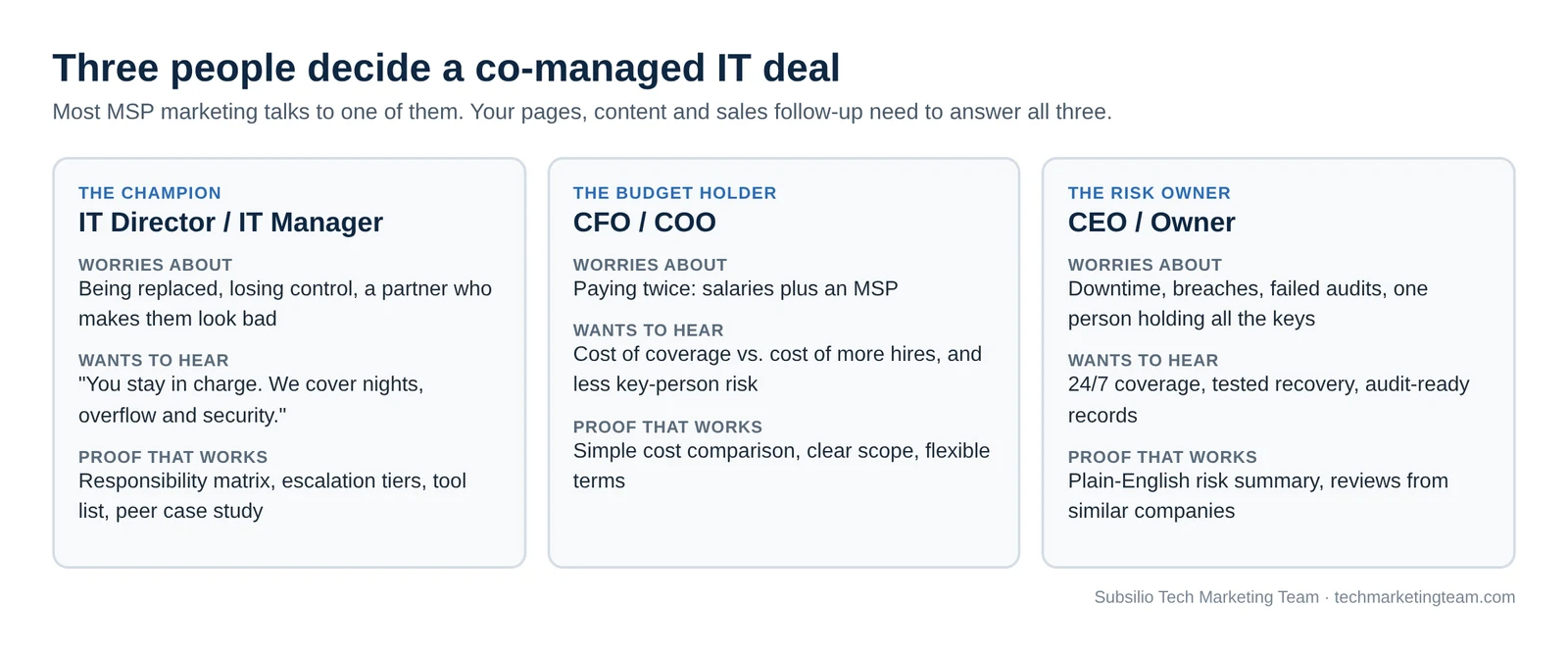
Your pages, content and sales follow-up need to answer all three buyers.
Position co-managed IT as backup, not replacement
The single most important message is simple: the IT director stays in charge. Every headline, service description and sales email should support that. Small wording choices make a big difference:
| Say this | Not this |
|---|---|
| “Extend your IT team” | “Outsource your IT” |
| “You set the priorities, we add coverage” | “We’ll take IT off your plate” |
| “After-hours and overflow support for your team” | “A complete IT department” |
| “Senior engineers your team can escalate to” | “Our experts fix what your team can’t” |
| “Everything documented in your systems” | “Our proprietary process” |
Also show what the IT director gains personally: nights and weekends back, a senior engineer to call when something breaks, time for the projects they keep postponing, and a stronger story for their leadership team. People champion what makes them look good. Make that easy.
Build a dedicated co-managed IT page that converts
A paragraph inside your managed services page is not enough. Co-managed IT needs its own page so it can rank for its own searches and answer its own buyer. Here is the structure that works:
- Who it’s for. Be specific: “Companies with one to ten internal IT staff who need more coverage, not a replacement.” Name the situations: team on call 24/7, help desk backlog, no security specialist, a big project coming up.
- The responsibility split. A clear table of what the internal team keeps, what you take on and what is shared. This is the most persuasive thing on the page.
- Escalation tiers and response times. Written as plain promises, not severity-level jargon.
- Tools and access. What you use, whether you can work inside their ticketing system, and how admin access is granted, logged and removed.
- Common starting points. After-hours coverage, help desk overflow, security monitoring, project help, compliance support.
- A pricing signal. A range, or the factors that move the price. Mid-market buyers shortlist on this.
- Onboarding and exit. What the first 30 days look like, and how a client can scale up, scale down or leave. Showing the exit builds trust.
- Proof. A co-managed case study and reviews from IT leaders, not just business owners.
- FAQs that answer real objections, written answer-first.
The writing method from our guide on managed IT services pages that explain outcomes, not jargon applies here too. For layout, calls to action and form placement, see how we approach high-converting websites for IT companies.
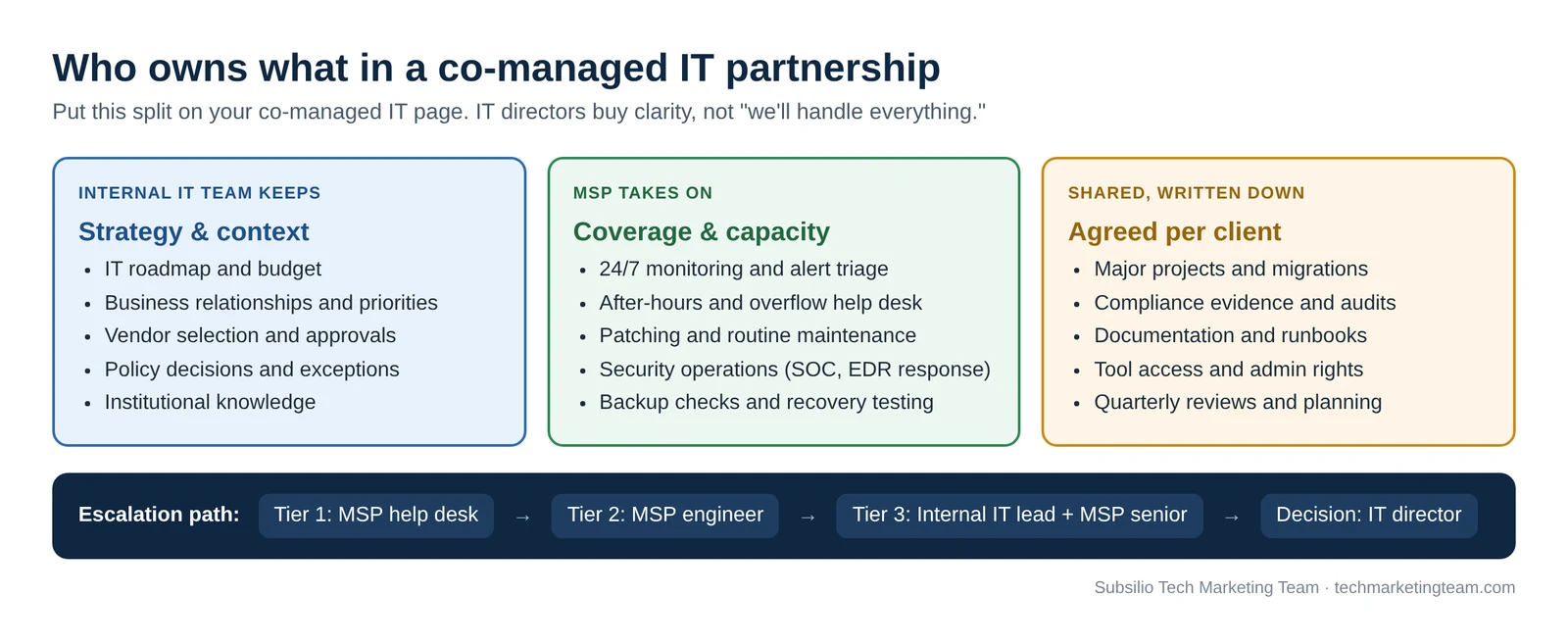
A responsibility split like this belongs on every co-managed IT page.
Keywords to target, and what each searcher wants
Search volume for co-managed terms is smaller than for “managed IT services,” but the intent is high. Local competition is also often weak, because few MSPs have a dedicated co-managed page. Match each keyword theme to the page that best answers it:
| Keyword theme | What the searcher wants | Best page to build |
|---|---|---|
| co-managed IT services [city] | Ready to compare providers | Dedicated co-managed page, plus local versions |
| co-managed IT vs managed IT | Deciding which model fits | Honest comparison article |
| what is co-managed IT | Early research | Answer-first explainer or FAQ |
| after-hours IT support, help desk overflow support | A specific gap to fill | Service section or sub-page |
| co-managed security, co-managed SOC | Security coverage for a lean team | Security service page |
| co-managed IT pricing / cost | Budgeting | Pricing section or guide |
For a Denver-based MSP, that means terms like “co-managed IT Denver” and “co-managed IT services Colorado.” If you serve several metros, build genuinely local versions rather than copies (see city-specific MSP pages for multi-location firms). Our MSP SEO services cover this keyword mapping in detail.
Content that earns IT directors’ trust (and AI citations)
IT directors research quietly and read carefully. AI assistants such as ChatGPT, Gemini and Google’s AI Overviews favour pages that give clear, specific, quotable answers. The same content does both jobs:
- A sample responsibility matrix (RACI). The most useful single asset you can publish. Offer an editable version as a download.
- A co-managed vs fully managed comparison. Be honest about when fully managed is the better fit. Honest comparisons get trusted, shared and cited.
- A “what we don’t touch” section. Spell out what stays with internal IT. It removes the replacement fear in one paragraph.
- Co-managed case studies by industry. Make the IT director the hero of the story, not your team. Our guide to industry-specific case studies for MSPs shows how to structure them.
- An escalation walkthrough. Describe a real incident: who got the alert, who was called, what the internal team decided, how it was documented.
- Sample QBR outputs. IT directors want to see how you report to them and their leadership. See turning QBRs into marketing assets.
- Answer-first FAQs with schema. Short, direct answers to real questions, marked up properly. See answer-first FAQ content for MSPs and our MSP schema markup guide.
Google’s own guidance on creating helpful, people-first content is the right standard here. Write for the IT director first; rankings and AI mentions follow. To plan which piece serves which stage of the decision, use content briefs by buyer stage.
Where to reach mid-market IT leaders
- Organic search. The highest-intent channel. IT directors search when a gap becomes painful: a resignation, an incident, an audit, a new project.
- Google Ads on co-managed terms. Keyword lists stay small, so budgets can too. Send clicks to the dedicated co-managed page, never the homepage. See our digital ads services.
- LinkedIn. Target by job title (IT Director, IT Manager, Director of Infrastructure) and company size. Share practical, useful posts and let your engineers show their expertise, rather than pushing a pitch. Our social media services cover this.
- Local peer groups and associations. In Denver, chapters of professional bodies such as ISACA and ISSA bring IT and security leaders together. Show up to help and teach, not to sell.
- Reviews from IT leaders. A review from an IT director carries more weight with this buyer than one from an office manager. Ask for them deliberately; our reputation services help build that process.
Sell small first, then expand
The easiest way into a mid-market account is a low-risk first engagement. Market specific entry offers rather than “full co-managed IT”:
- After-hours and weekend coverage
- Security monitoring added on top of the internal team’s work
- A defined project, such as a Microsoft 365 clean-up, a migration or a backup and recovery test
- Help desk overflow during a busy period or staff absence
Once trust is earned, these relationships tend to grow into ongoing coverage, then security, compliance support and vCIO services.
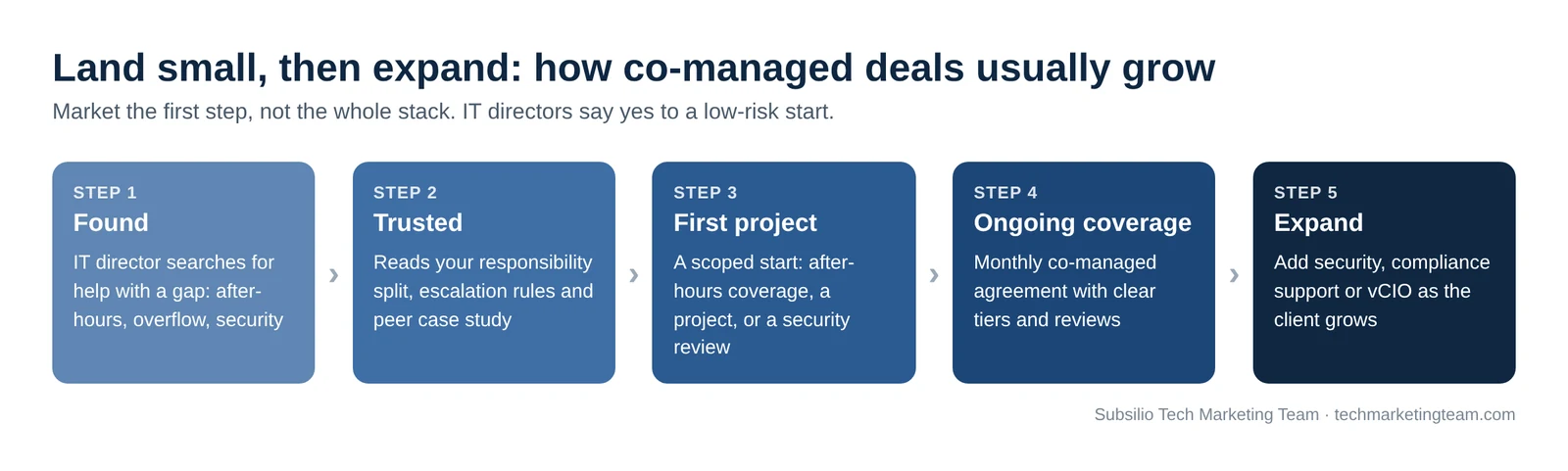
Market the first step, not the whole stack.
Support the deal after the first call, too. Give the CFO a one-page comparison of coverage costs against the cost of new hires. Give the CEO a plain-English summary of the risks being reduced. Give the IT director something to forward internally.
How to measure whether it’s working
- Impressions and clicks for co-managed queries in Google Search Console
- Enquiries from the co-managed page, tracked as conversions in GA4
- Share of leads where the contact is an IT director or IT manager
- How many first engagements turn into ongoing agreements
- Revenue per co-managed account after 12 months
- Whether AI assistants mention you when asked about co-managed IT in your area (test the same prompts monthly)
Our guide on measuring MSP SEO and AI visibility with GSC and GA4 shows how to set these up.
Common mistakes to avoid
- Using one page to sell both fully managed and co-managed IT
- Talking to the business owner and ignoring the IT director
- Hiding the scope behind “flexible to your needs”
- Leading with your tool stack instead of the coverage it gives
- No clear way to scale down or exit
- Pitching at peer events where people came to learn
Final thoughts
Co-managed IT opens the door to larger, more stable clients that would never hand over their whole IT function. But it only works when your marketing treats the internal IT team as a partner. Give co-managed IT its own page, publish a clear responsibility split, target the searches IT directors actually make, and offer a small, safe first step. Do that, and the person most likely to block the deal becomes the one who sells it internally for you.
Subsilio Tech Marketing Team works only with IT companies and MSPs. We build co-managed service pages, keyword plans, content and campaigns that speak to IT directors, CFOs and owners. Book a free strategy call and we’ll review how your site presents co-managed IT today and where the quickest wins are.
Frequently Asked Questions
What is co-managed IT?
Co-managed IT is a model where an MSP works alongside a company’s internal IT team. The internal team keeps strategy and decision-making, while the MSP adds services such as 24/7 monitoring, help desk overflow, security operations and project support.
How is co-managed IT different from fully managed IT?
With fully managed IT, the MSP is the company’s IT department. With co-managed IT, the company keeps its own IT staff and the MSP fills specific gaps. The buyer is different too: fully managed is usually bought by an owner, co-managed by an IT director.
Who is the best target buyer for co-managed IT services?
Mid-market companies, roughly 100 to 1,000 employees, with one to ten internal IT staff. The IT director or IT manager usually starts the search, while the CFO and CEO approve budget and risk.
How do you convince an IT director that an MSP isn't a threat to their job?
Show it in writing. Publish a responsibility split that keeps strategy and decisions with the internal team, explain the escalation path, and describe what the IT director gains: after-hours relief, senior backup and time for projects. Case studies with IT directors as the hero help most.
What should a co-managed IT services page include?
Who it’s for, a responsibility split, escalation tiers and response times, tools and access rules, common starting points, a pricing signal, onboarding and exit terms, proof from IT leaders, and answer-first FAQs.
Should MSPs publish co-managed IT pricing?
At least publish a range or the factors that affect price, such as users, devices, hours covered and security services included. Mid-market buyers shortlist providers before they call, and pages with no pricing signal are often skipped.
What keywords should an MSP target for co-managed IT?
Start with “co-managed IT services” plus your city, then “co-managed IT vs managed IT,” “what is co-managed IT,” gap-specific terms like “after-hours IT support” and “help desk overflow support,” and “co-managed security” or “co-managed SOC.”
How long does it take to see results from marketing co-managed IT?
Paid search can produce enquiries within weeks. Organic rankings for co-managed terms usually take three to six months, depending on competition and your site’s current authority. Mid-market sales cycles are longer than small-business deals, so judge results over two to three quarters.