



Here is a sentence from a real MSP website, lightly edited to remove anything identifying:
“We deliver proactive, enterprise-grade managed services leveraging best-in-class RMM and PSA tooling to optimize your IT infrastructure and maximise uptime through our comprehensive monitoring stack.”
Now consider who reads that. It is rarely a CIO. In a 30 to 150 person business, the core of the managed services market, the person shortlisting IT providers is usually an operations manager, a finance director, a practice manager or the owner. They are competent, busy, and they do not know what RMM stands for. They are not going to ask.
What they are actually trying to find out is narrow and practical: if something breaks, how fast does someone help us, what will this cost every month, and will this be less annoying than what we have now?
That sentence answers none of it. And the cost is not just conversion. Pages written in acronyms make weak search pages too, because they do not contain the words real people type, and they give AI systems nothing concrete to retrieve or cite.
This guide covers how to rebuild a managed IT services page around outcomes: the translation method, the page structure, how to handle pricing and SLAs honestly, and where the line sits between clarity and dumbing down.
Why jargon is a commercial problem, not a style problem
Three mechanisms turn technical language into lost revenue.
It transfers work to the buyer. Every unexplained term is a small task you have handed the reader. Enough of them and they leave, not because they were not interested, but because understanding you became effortful and a competitor’s page was easier.
It signals the relationship they will have with you. This is the one MSPs miss. A buyer reading a jargon-heavy page is not just failing to understand the service, they are forecasting what it will be like to call your help desk when they are stressed and something is broken. If the marketing page talks down to them, the support experience probably will too. Clarity on the website is a promise about the service, and buyers read it that way.
It makes the page invisible. People search using symptoms and consequences: “our computers are so slow,” “IT support for a law firm,” “who do we call when the server goes down.” They do not search for “proactive infrastructure optimization.” A page written entirely in vendor language has no surface area for real queries, and offers a retrieval system with nothing specific to ground an answer in.
A test worth running today: send your managed IT page to three people who do not work in IT: a friend in accounting, someone in retail, your own office manager. Ask them one question: “what do these people actually do, and what would it cost us?” If they cannot answer in a sentence, neither can your buyers.
The translation method
The instinct when told to remove jargon is to delete the technical terms. That produces vagueness, which is worse: “we take care of your technology so you can focus on your business” says even less than the acronym version did.
The method that works is a three-step chain: feature → mechanism → consequence for this reader. Keep the specificity, move it into the reader’s world.
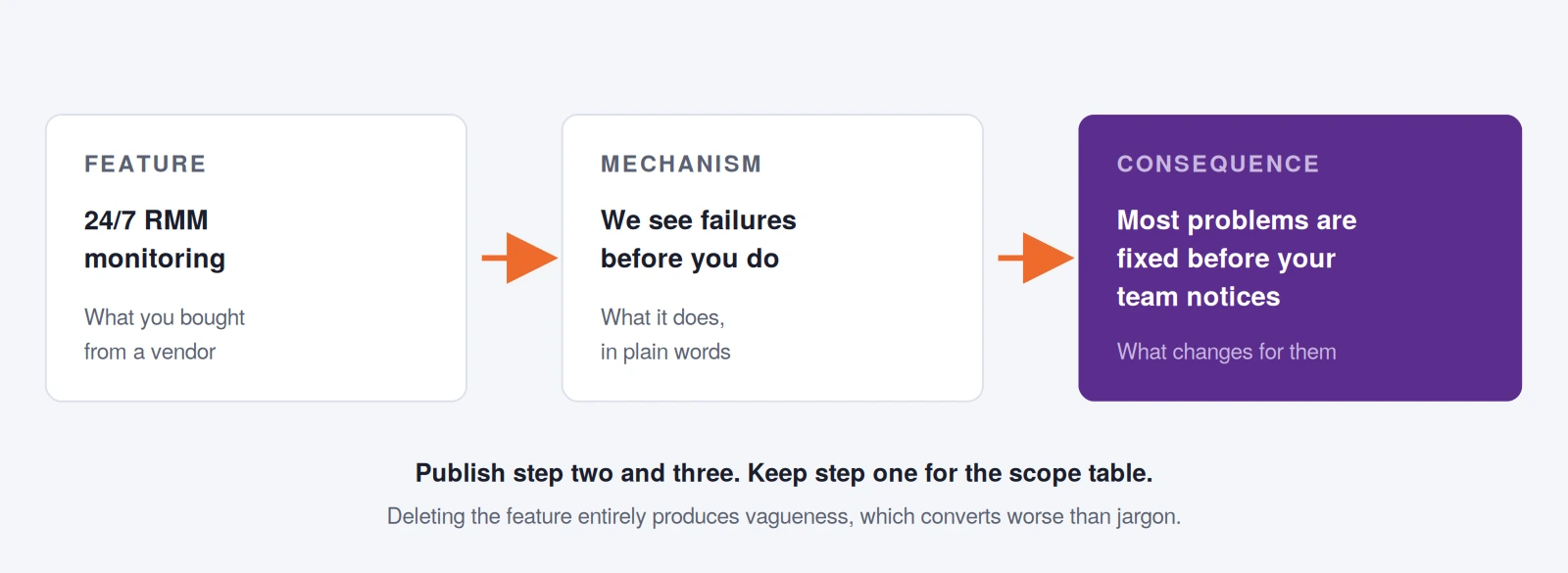
The translation table
Here is the same method applied to the terms that appear on almost every managed IT page. Use this as a working reference when rewriting.
| What MSPs write | What the buyer needs to read |
|---|---|
| Proactive monitoring / RMM | We watch your systems around the clock, so most problems get fixed before your team notices them |
| Patch management | We keep every computer updated, on a schedule, outside your working hours |
| Endpoint protection | Every laptop, desktop and server is protected and monitored, including the ones people take home |
| Business continuity / BCDR | If your systems go down, here is how quickly you are working again and how much data you could lose |
| Tiered SLA structure | If your whole office is down we start within X minutes. If one printer is broken, within X hours |
| vCIO services | A quarterly session where we tell you what to spend on next year and why, in budget terms |
| Cloud migration | Moving your files and email off the server in the cupboard, with a plan for the day it happens |
| Help desk / service desk | Who your staff call, how they reach us, and how long they typically wait |
| Network optimisation | Fixing the wifi that drops in the back office and the connection that slows every afternoon |
| Vendor management | We deal with your internet provider and software companies so your team doesn’t have to |
| Asset lifecycle management | We tell you which machines need replacing next year, so it’s budgeted rather than urgent |
| Onboarding / offboarding | New starters have working accounts on day one; leavers lose access the hour they leave |
Notice what did not happen: nothing became less specific. The right-hand column is more concrete than the left. That is the point. Jargon feels precise but is actually a compression: it hides the specifics behind a label. Unpacking it gives you better copy and better search coverage at the same time.
The onboarding and offboarding line is your sharpest one
It is worth pausing on that final row, because it is the most under-used sentence in MSP marketing.
Every operations manager in a growing business has personally experienced a new employee sitting at a desk on Monday morning with no email, no login and nothing to do. It is embarrassing, it wastes money, and it is completely concrete. When your page says new starters have working accounts on day one, the reader does not need any technical context to understand the value, they have already lived the absence of it.
Find your version of that sentence. Every MSP has three or four moments where the client’s real, felt pain is specific and universal. Those beat every abstract benefit statement you could write.
The page structure that works
Structure carries as much weight as wording, because most visitors scan. Here is the order we use.
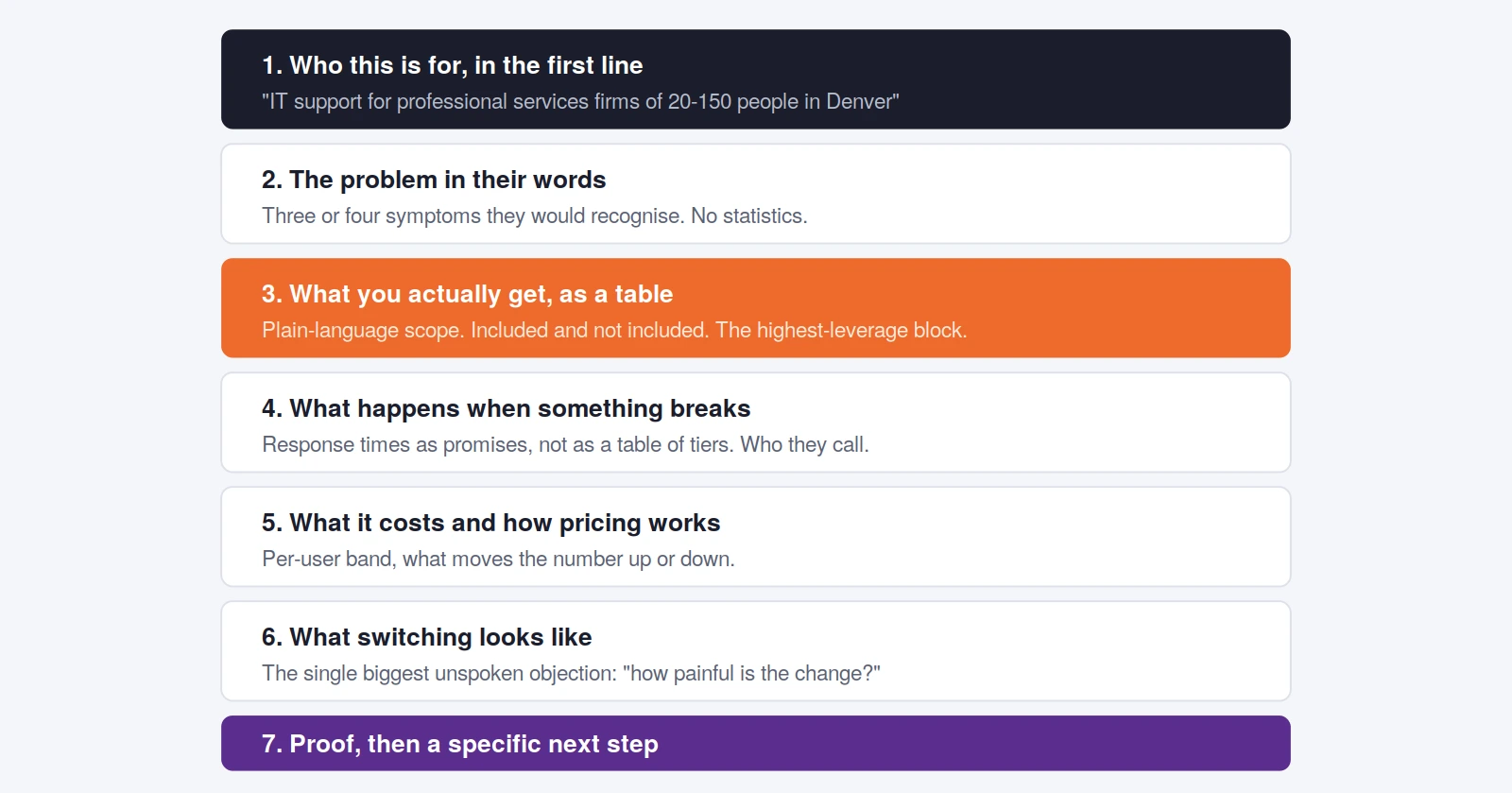
Section 3: the scope table
Replace the bullet list of services with a table showing what is included, what costs extra, and what you do not do. Buyers read exclusions as honesty. Competitors who list only inclusions look, by comparison, like they are hiding something, and after two or three provider conversations, the buyer is actively hunting for whoever will just tell them.
Section 4: turn the SLA into promises
An SLA table with P1/P2/P3 severity tiers is an internal document. What the buyer needs is: “If nobody in your office can work, we are on it within 15 minutes. If one person has a problem that is stopping them working, within an hour. Everything else, same business day.” Same information, stated as a commitment rather than a classification scheme.
Add the human layer that MSPs consistently forget: who answers, whether they get the same engineers, whether there is a phone number or only a portal, and what the hours are. Buyers care enormously about this and almost nobody publishes it.
Section 5: pricing
You do not have to publish a rate card. You do have to give a signal. State a per-user band, then name the three or four things that move a client up or down within it: compliance requirements, the age of their hardware, whether they have on-premise servers, how many locations. This does two things at once: it filters out prospects who were never in range, and it demonstrates that your pricing has a logic, which is itself reassuring.
Section 6: what switching looks like
This is the omission that costs the most deals. A prospect unhappy with their current provider is not weighing you against them on merit, they are weighing the discomfort of switching against the discomfort of staying. If your page does not address the transition, staying wins by default.
Cover: how long onboarding takes, what their team has to do, whether anything goes down, how you handle a hostile incumbent, what happens to their existing contracts, and what week one looks like. This section frequently outperforms everything above it on engagement, because it is the question the reader has and cannot ask yet.
The wider shift here, from being a break-fix supplier to being the partner a client plans with, is covered in our piece on transforming MSPs from break-fix to trusted partner.
Where clarity helps search and AI visibility
Plain language is not only a conversion improvement. It changes how discoverable the page is.
It matches real queries. People search for symptoms. A page containing the sentence “the wifi drops in the back office” has surface area for queries that no amount of “network optimisation” will ever match.
It gives retrieval systems something to ground on. Google’s generative AI features work by retrieving relevant pages from the index and generating an answer from specific information on them. A page of abstractions offers nothing to extract. A page that states response times, scope boundaries, price bands and onboarding timelines is full of extractable, attributable facts.
It survives query fan-out. When a user asks a broad question, the system generates related sub-queries behind the scenes. A managed IT page that separately and clearly addresses cost, response times, onboarding and scope answers several of those sub-queries; a page that addresses only “what is managed IT” answers none.
One clarification worth making, because a lot of advice circulating online gets it wrong: you do not need to rewrite content into a special format for AI systems. Google states directly in its generative AI optimisation guide that there is no requirement to chunk content into small pieces, no special markup needed, and no benefit from llms.txt files as far as Google Search is concerned. Writing clearly for humans is the optimisation. For more on what genuinely changed, see MSP SEO in 2026.
Where the line sits between clear and condescending
There is a real risk of over-correcting, and it shows up as copy that reads like it was written for a child. Some guardrails:
- Never explain the buyer’s own business to them. Explain your service. They know what a law firm does.
- Keep the technical detail available, just not in the way. A “technical specifications” expander below the scope table serves the minority of buyers with an internal IT person, without taxing the majority who do not.
- Do not remove precision. “Fast response” is worse than “within 15 minutes.” Vagueness is not clarity.
- Use their vocabulary, not a simplified version of yours. A dental practice manager says “our imaging software,” not “line of business applications.” Industry pages should use the industry’s words.
- Read it aloud. If you would not say the sentence to a client across a table, do not publish it.
A rewrite worth copying
Take the opening line from the start of this article and apply everything above:
Before: “We deliver proactive, enterprise-grade managed services leveraging best-in-class RMM and PSA tooling to optimize your IT infrastructure and maximise uptime through our comprehensive monitoring stack.”
After: “We look after IT for professional services firms of 20 to 150 people. Your staff get one number to call and usually reach someone in under a minute. We watch your systems around the clock, so most problems are fixed before anyone notices. Most clients pay between X and Y per person per month.”
The second version is longer in words and shorter in effort. It contains four specific, checkable claims. It uses language a buyer would use. And it gives a search engine (or an AI answer engine) four concrete things it could retrieve and cite.
That is the whole discipline. Not simplifying. Specifying, in the reader’s language, about things that actually matter to them.
Want your service pages rewritten around outcomes?
We build websites and service pages for IT providers and MSPs that non-technical buyers understand and act on, with scope, pricing signals and onboarding clarity built in.
Book a free strategy call, or see our conversion-focused website service.
What should a managed IT services page include?
At minimum: who the service is for, the problems it solves in the buyer’s own words, a plain-language scope table showing what is included and excluded, what happens when something breaks including response commitments, a pricing signal, what switching providers involves, proof, and a specific next step. The switching section is the one most commonly omitted and the one that blocks the most deals.
Should MSPs remove all technical terms from their website?
No. Remove technical terms from the places where a non-technical buyer is making a decision, and keep them available where a technically literate reader can find them. A scope table or an expandable technical specifications section serves both audiences. The failure mode to avoid is replacing jargon with vagueness: “fast response” is less useful than “within 15 minutes.”
How do I explain SLAs to a non-technical buyer?
Convert severity tiers into promises written from the client’s perspective. Instead of a P1/P2/P3 table, write what each situation means for them: nobody can work, one person cannot work, or something is inconvenient but not blocking. State the response time for each in minutes or hours, and add the details buyers actually ask about: whether there is a phone number, whether they get the same engineers, and what the support hours are.
Should managed IT services pricing be published on the website?
Publish a band rather than a fixed price, along with the factors that move a client up or down within it: number of locations, compliance requirements, hardware age, whether there are on-premise servers. This filters out prospects who were never in range, and demonstrates that your pricing follows a logic. Complete silence on price is the single most common reason qualified buyers leave an MSP site without making contact.
Does plain-language copy hurt SEO for technical keywords?
No, and it usually helps. Buyers search in symptoms and consequences rather than vendor terminology, so plain-language copy matches far more real queries. You can still include technical terms naturally where they genuinely appear, in a scope table, in technical specifications, or where the audience genuinely uses them. Google’s systems understand synonyms and meaning, so you do not need to repeat every phrasing variation.
How long should a managed IT services page be?
There is no ideal length, and Google says so directly. Length should follow what the buyer needs to decide. In practice a complete managed IT page covering scope, response, pricing, switching and proof runs 1,200 to 2,000 words. A shorter page that answers the real questions outperforms a longer one padded with definitions of managed services.
What is the most persuasive thing to put on an MSP services page?
A concrete, universally recognised moment of relief. The strongest examples are operational rather than technical: new employees having working accounts on their first morning, leavers losing access the hour they go, someone answering the phone in under a minute. These work because the reader has personally experienced the absence of them and needs no technical context to understand the value.