



Collecting reviews and displaying reviews are two different competencies, and most MSPs are better at the first than the second. A firm with sixty genuine five-star Google reviews will frequently bury them behind a “Testimonials” link in the footer, where roughly nobody goes, and then wonder why the review programme has not moved the conversion rate.
The problem is that trust sections get treated as decoration. A carousel here, a row of logos there, a star rating somewhere near the fold. They look like proof, so everyone assumes they work like proof. Often they do the opposite: a section that is obviously generic advertising trains a visitor to discount everything around it.
This guide covers what a review wall is for, where proof belongs on the page, what to display and what to leave out, and the structured data rules that catch a lot of MSP sites out.
What a review wall is, and why carousels underperform
A review wall is a dense, static display of multiple real reviews visible at once , usually a grid or masonry layout, each entry attributed, each sourced.
A carousel shows one testimonial at a time and rotates automatically.
The wall generally wins, for reasons that have been consistent for years:
- Volume is the message. Seeing twelve reviews at once communicates something that seeing one, twelve times, does not. Reading any of them is optional; the impression of depth lands immediately.
- Auto-rotation fights the reader. Content that moves while someone is reading it is an accessibility problem and an annoyance. Most people stop attending to it entirely , the same reflex that makes banner advertising invisible.
- Carousels hide content from crawlers and readers alike. Items beyond the first slide are frequently loaded on interaction, which means they may not be in the initial HTML at all.
- Walls are scannable. A visitor looking for evidence that you handle their specific situation can scan twelve reviews for a relevant one. A carousel makes them wait.
If you keep a carousel, remove auto-advance and ensure every slide is present in the page source on load.
The placement principle: proof beside the claim
This is the highest-leverage idea in the article, and it is almost universally ignored.
Objections form at specific moments while someone reads a page. The proof that answers an objection should sit at that moment, not on a separate page the visitor will never open.
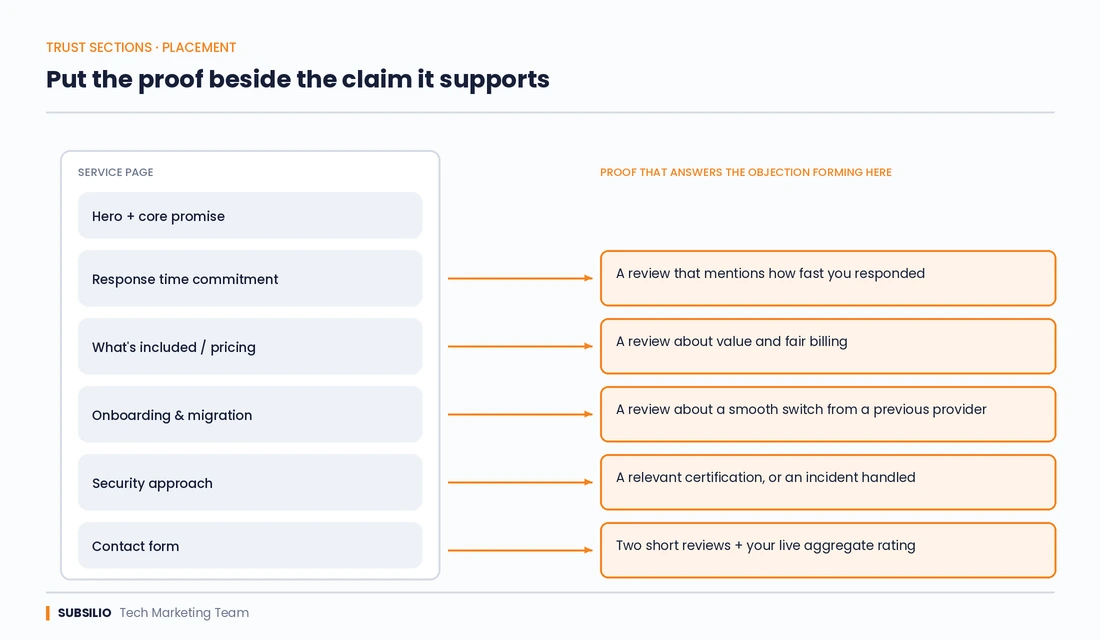
Diagram matching each section of an MSP service page to the review or proof element that answers the objection forming there.
| Where the claim sits | What proof belongs there |
|---|---|
| Response time commitment on a service page | A review that mentions how quickly you responded |
| Pricing or contract section | A review from a client speaking about value or fairness |
| Onboarding or migration description | A review about a smooth transition from a previous provider |
| Cybersecurity service page | A review referencing an incident handled, or a relevant certification |
| Contact form or booking widget | Two or three short reviews and your aggregate rating, immediately adjacent |
| Location or city page | Reviews from clients in that specific city |
A dedicated reviews page still has a job , it ranks for brand-plus-reviews searches and gives serious prospects somewhere to go deep. But it should be the overflow, not the only home. The reviews that change decisions are the ones a visitor encounters without looking for them.
Our guide to managed IT services pages that explain outcomes, not jargon covers how these proof elements fit into the wider structure of a service page.
What makes a displayed review persuasive
Not all reviews are worth the space they occupy. The difference between the two columns below is the difference between a section that converts and one that visitors skip.
| Weak display | Strong display |
|---|---|
| “Great service! I highly recommend it.” , J.D. | “Our server failed on a Friday afternoon and they had us running by Saturday morning. We lost half a day instead of a week.” , Operations Director, 40-user manufacturing firm |
| Unattributed first names only | Full name, role and company where permission allows |
| No source indicated | Clearly marked as a Google review, linking to the profile |
| Stock photograph of a smiling stranger | Real photo, a company logo, or no image at all |
| Undated | Dated, and recent |
| All five stars, all identical in tone | A genuine range of voices, including measured ones |
| Same six testimonials on every page | Reviews selected for relevance to that page’s subject |
The selection criteria that matter most: specificity, recency, and relevance to the page. A review that names a real problem and a real outcome does more work than five that say you are professional and responsive.
On attribution, be pragmatic. Many MSP clients will not allow their company name to be used publicly, particularly in regulated sectors or after a security incident. “Operations Director, 40-user manufacturing firm in Colorado” is credible and anonymous. A bare first initial is neither.
The trust section stack
Reviews are one component. A complete trust section for an MSP has a rough order of persuasive value:
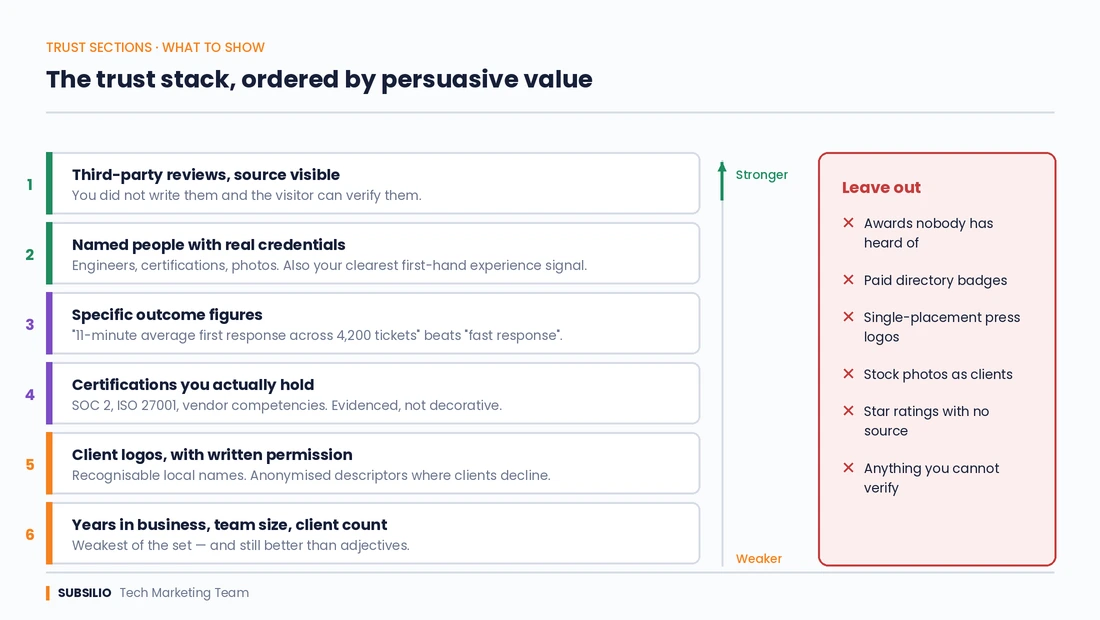
The MSP trust stack is ranked by persuasive value, from third-party reviews down to years in business, with elements to leave out.
- Third-party reviews with a visible source. Strongest, because you did not write them and the visitor can verify them.
- Named people with real credentials. Your engineers, their certifications, their photos. Anonymous “expert teams” persuade nobody, and this is also the clearest signal of first-hand experience for search engines assessing the page. Our about page takes this approach.
- Specific outcome evidence. “Average first response of 11 minutes across 4,200 tickets last quarter” beats “fast response times” by a wide margin. Numbers you can defend.
- Relevant certifications and compliance attestations. SOC 2, ISO 27001, vendor competencies. Display only what you genuinely hold and can evidence.
- Client logos, with written permission. Recognisable local names work well. Logos of companies you have never served are fraud, not marketing.
- Case studies with named outcomes. Even anonymised, provided the numbers are real.
- Years in business, team size, client count. Weakest of the group, and still better than adjectives.
Note what is not on this list: awards nobody has heard of, badges from directories you paid to join, and “as featured in” logos for a single paid placement. Experienced buyers recognise all three, and their presence devalues the genuine items sitting next to them.
What never to do
These are the practices that turn a trust section into a liability.
Fabricated or composite testimonials. Inventing a plausible client name and writing a review yourself is fraud. In the US it is also a violation of the FTC’s rule on consumer reviews and testimonials, which carries civil penalties. It is more common on agency and MSP websites than anyone admits, and it is usually obvious: generic company names with no web presence, no links, no photos, and prose that reads like marketing copy because it is.
A quick self-test worth running on your own site right now: take every testimonial you display and try to verify it. Does the company exist? Can you produce the original review or the written permission? If any fail, remove them today. A single unverifiable testimonial discovered by a prospect costs more than the whole section earns.
Star ratings with no source. A five-star graphic with no platform attached is a graphic, not a rating.
Review gating. Filtering clients so only the happy ones reach a public review breaches platform policy and, in the US, the FTC rule. Our guide to when to ask for a Google review after resolving a ticket covers how to solicit reviews without crossing that line.
Stock photography presented as clients. Reverse image search takes ten seconds and the discovery discredits everything else on the page.
Aggregate ratings that do not match your live profile. If your site claims 4.9 and your Google profile shows 4.3, the discrepancy is visible to anyone who checks, and checking is one click.
Structured data: the rule most MSPs get wrong
This catches out a large number of service businesses, so it is worth stating precisely.
Google does not support review rich results for reviews a business writes about itself. Self-serving reviews , those you collect and publish on your own site about your own business , are not eligible for review snippets when marked up on a LocalBusiness or Organization entity. Marking up your own testimonial wall with AggregateRating in the hope of getting stars in search results does not work, and adding structured data that does not comply with the guidelines can trigger a manual action against the site.
What this means practically:
- Do not add
AggregateRatingto your own homepage or service pages based on testimonials you host yourself. - Your Google Business Profile rating is what appears in local results. That is the surface where your star rating is visible, and it is earned on the profile rather than declared in your markup.
Reviewmarkup remains legitimate where you are genuinely reviewing something other than yourself , a product, a piece of software, a third party.- The reviews on your page still carry value for conversion, for the language they add to the page, and for what AI systems read when assessing your credibility. They just do not produce stars in Google.
Google’s review snippet documentation sets out the restriction. Our MSP schema markup guide covers the structured data types that do earn results for IT providers.
Performance and accessibility
Trust sections are a common cause of slow pages, which is a poor trade for a section meant to build confidence.
- Third-party review widgets are heavyweight. Many load their own JavaScript, fonts and stylesheets, and render client-side. A widget that delays your largest contentful paint is costing you more visitors than the reviews are converting. Where possible, pull reviews via API and render them server-side as plain HTML.
- Client-side rendering hides content. If reviews only exist after JavaScript executes, they may not be seen by crawlers or by the AI systems reading your page. Check the rendered source.
- Lazy-load images, size them properly, and use modern formats. A wall of client logos should not be a wall of full-resolution PNGs.
- Remove auto-rotation, ensure adequate colour contrast on star graphics, and give each review a sensible heading structure so screen readers can navigate the section.
If you are planning a rebuild, decide the review rendering approach before development starts rather than bolting a widget on afterwards. Our high-converting websites service treats this as part of the build.
Measuring whether it works
Most MSPs never test their trust sections, which means every decision above is being made on opinion.
- Scroll depth and engagement on the section, via GA4. If nobody reaches it, placement is the problem, not the content.
- A/B test placement, not wording. Moving reviews next to the form usually produces a larger effect than rewriting them.
- Compare conversion rate on pages with and without page-relevant proof. Roll it out on half your service pages first.
- Ask on sales calls whether the prospect read the reviews and which one they remembered. Small sample, unusually direct signal.
- Watch outbound clicks to your Google profile. People verifying your reviews is a buying signal, not a leak.
Our guide to measuring MSP SEO and AI visibility with GSC and GA4 covers the reporting setup.
The summary
A review wall is not a design element. It is the answer to a question the visitor is asking silently, and it works to the extent that it appears where the question forms, says something specific, and can be verified.
The MSPs who get value from this are the ones who put a handful of genuinely relevant reviews next to every claim that needs supporting, attribute them honestly, keep them current, and accept that a real 4.6 with detailed reviews outperforms a manufactured 5.0 every time.
And if any part of your current trust section could not survive a prospect fact-checking it, that is the first thing to fix , before the layout, before the schema, before anything else.
Want your proof working harder?
We build reputation programmes and conversion-focused websites for IT providers and MSPs, including getting real reviews collected, displayed and placed where they actually change decisions.
Explore our reputation marketing service and high-converting websites service, or book a free strategy call.
What is a review wall on a website?
A review wall is a dense, static display of multiple genuine customer reviews shown together, usually in a grid or masonry layout, with each review attributed and its source identified. It differs from a testimonial carousel, which shows one review at a time and rotates. Walls generally perform better because the volume of visible proof registers immediately and visitors can scan for a review relevant to their own situation.
Where should reviews go on an MSP website?
Beside the claims they support, rather than only on a dedicated testimonials page. Place a review about response times next to your response time commitment, a review about a smooth migration next to your onboarding section, and two or three short reviews immediately adjacent to your contact form. A separate reviews page is still useful for brand searches and serious prospects, but it should supplement in-page proof rather than replace it.
Do testimonial carousels hurt conversion rates?
Auto-rotating carousels generally underperform static displays. Content that moves while someone is reading it is an accessibility problem and tends to be ignored, and slides beyond the first are often loaded on interaction, which hides them from crawlers and from readers who never click. If you keep a carousel, disable auto-advance and ensure every slide is present in the initial HTML.
Can I add a review schema to my own website to get stars in Google?
No. Google does not support review rich results for self-serving reviews, meaning reviews a business collects and publishes about itself. Adding AggregateRating markup to your own homepage or service pages based on testimonials you host will not produce stars, and structured data that breaches the guidelines can trigger a manual action. Your visible star rating in local results comes from your Google Business Profile.
What should be in an MSP website trust section?
In rough order of persuasive value: third-party reviews with a visible source, named team members with real certifications and photos, specific outcome figures you can defend, relevant compliance attestations such as SOC 2 or ISO 27001, client logos used with written permission, and case studies with real numbers. Omit obscure awards, paid directory badges and single-placement “as featured in” logos, which experienced buyers discount and which devalue the genuine items beside them.
Is it illegal to write your own testimonials?
In the US, fabricated testimonials violate the FTC’s rule on consumer reviews and testimonials, which carries civil penalties, and comparable rules exist in most developed markets. Beyond the legal exposure, invented testimonials are usually detectable: generic company names with no web presence, no links, no photographs and prose that reads like marketing copy. If you cannot verify a testimonial on your site or produce written permission for it, remove it.
Should MSPs show client logos on their website?
Only with written permission, and only for clients you genuinely serve. Recognisable local business names carry real weight with prospects in the same market. Many MSP clients decline, particularly in regulated sectors, in which case an anonymised descriptor such as “a 120-user healthcare provider in Denver” is credible and safe. Displaying logos of companies you have not worked with is fraud rather than marketing.
How many reviews should an MSP display on a page?
Two or three placed next to a specific claim, or eight to twelve on a dedicated review wall. More than a dozen in one block stops being read and starts being scrolled past. Select for relevance to that page’s subject rather than simply showing your most flattering reviews, and refresh the selection as newer reviews arrive so the section does not visibly age.