



A negative review is not a crisis. A bad reply to one can be. Here is how an MSP should respond, what it must never say, and when a review can be removed.
An MSP should respond to a negative review publicly, within a day or two, in a calm and short reply that acknowledges the experience, confirms nothing about the client’s systems or data, and moves the conversation offline with a named contact. Then fix the underlying problem. If the review is fake, from someone who was never a client, or breaks Google’s content policies, report it through your Google Business Profile. You cannot delete it yourself.
That is the short answer. The longer one matters more for managed service providers than for most businesses, for two reasons.
First, your buyers are nervous. A business owner choosing an MSP is handing over access to every system they run. They read reviews looking for one thing: evidence of how you behave when something goes wrong. Your reply to a one-star review often tells them more than your fifty five-star ones.
Second, your replies carry legal and security risks that a restaurant does not. A careless sentence about a client’s outage, a missed patch or a ticket history can breach your contract, your client’s trust and, for healthcare clients, federal privacy law.
This guide covers the full playbook we use with IT service providers: how to triage a negative review, a reply structure that works for every type, templates you can adapt, what to report and how, and how to stop the same complaint appearing again.
Why negative reviews hit MSPs harder than most businesses
Trust is the product. An MSP sells reliability, security and responsiveness. A review saying “they took three days to call back” goes straight to the heart of what you sell.
Review volume is low. A 60-seat client is one review, not sixty. An MSP with a few dozen clients might have a few dozen reviews at most, so one negative review moves your average far more than it would for a high-volume business.
Local rankings are affected. Google’s guidance on improving your local ranking says more reviews and positive ratings can help a business’s local ranking, and that “positive reviews and helpful replies can help your business stand out.” For a Denver or Arvada MSP competing in the map results against dozens of other IT providers, that matters.
AI answers summarize sentiment. When a prospect asks an AI assistant “Who are the best managed IT providers in Denver?”, the answer draws on what is published about each business. A pattern of unanswered complaints is part of that picture. We cover this in more depth in how to get your MSP mentioned in ChatGPT and AI search results.
The reply lasts longer than the complaint. The reviewer reads your reply once. Every future prospect who checks your profile reads it again. Write for them.
Before you reply: triage the review
Not every negative review needs the same response. Before anyone types a word, spend five minutes working out what kind of review it is.
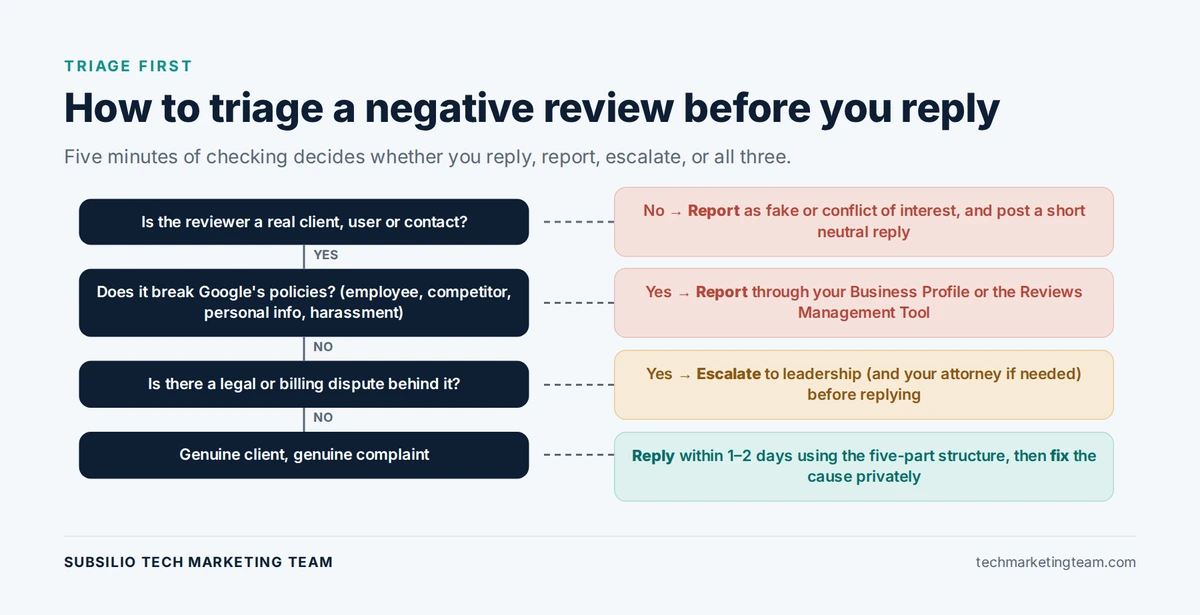
- Is the reviewer a real client or contact? Search your PSA and CRM for the name, company and approximate date. Check whether they were a user at a client site rather than the decision-maker. End users leave reviews too, and their frustration is often with a policy their employer asked you to enforce.
- Is the complaint fair? Pull the ticket history. Was the response slow? Was the fix wrong? Was the communication poor? Be honest. Most negative reviews contain at least some truth, even when the tone is unfair.
- Does the review break Google’s policies? Google’s prohibited and restricted content policy covers fake engagement, conflicts of interest (including reviews from current or former employees and competitors), off-topic content, harassment and personal information. If the review falls into one of those categories, you may be able to have it removed.
- Is there a legal dimension? If the reviewer is a terminated client in a billing dispute, a former employee, or someone threatening legal action, involve your leadership and, where needed, your attorney before replying.
- Who owns the reply? One person, usually the owner or client success lead, should write and approve every reply. Not a technician, and not a tool that posts automatically.
The five-part reply that works for almost every negative review
Every good reply to a negative review has the same five parts. Keep the whole thing under about 100 words.
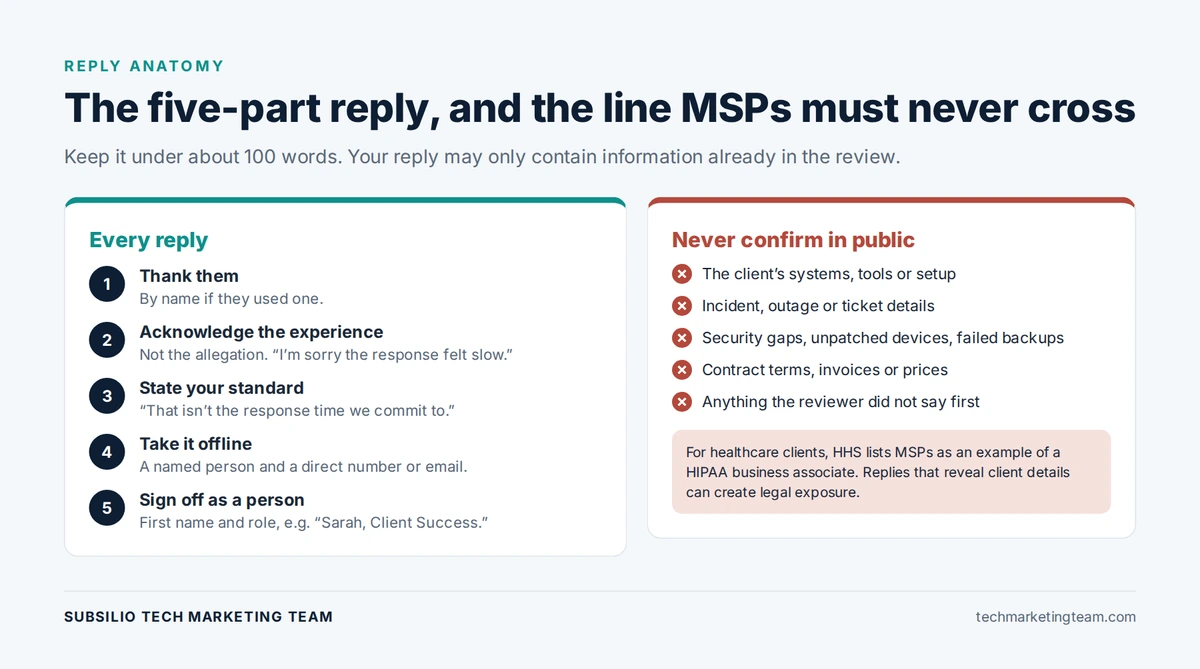
A five-part reply, with the confidentiality line every MSP must hold.
- Thank them, by name if they used one. It sounds simple and it disarms more than any argument.
- Acknowledge the experience, not the allegation. “I’m sorry the response to your issue felt slow” acknowledges how they felt without confirming facts about a ticket in public.
- State your standard in one line. “That isn’t the response time we commit to.” This tells future prospects what to expect from you.
- Move it offline with a named person. A name and a direct phone number or email. Never “please contact our support team.”
- Sign off as a person. A first name and role make the reply read as accountable rather than corporate.
The confidentiality line MSPs must never cross
This is where MSP replies go wrong most often. In an effort to defend themselves, owners explain what “really” happened: the client refused the upgrade, the firewall was out of support, the user clicked the phishing link, the backup had not been tested.
Even if every word is true, do not write it. A public reply that describes a client’s environment, incident, ticket history, security posture or contract terms can:
- Breach the confidentiality clause in your master services agreement
- Advertise a client’s vulnerabilities to anyone reading
- Break privacy law. HHS guidance on HIPAA business associates specifically lists a managed services provider that supports a covered entity’s systems as an example of a business associate. Healthcare providers have been penalized for disclosing patient information while responding to online reviews, and the same caution applies to the MSPs who support them.
Our rule for clients is simple: your reply may only contain information that is already in the review. If the reviewer did not say it, you do not confirm it.
Reply templates for the most common MSP review types
Adapt these rather than copying them word for word. A reply that reads like a template tells prospects you did not really listen.
Slow response or missed SLA
“Thank you for the feedback, Mark. I’m sorry the response to your issue felt slow. That isn’t the standard we set for ourselves or our clients. I’d like to understand what happened and make sure it’s put right. Please call me directly at [number]. Sarah, Client Success Manager”
The problem was not fixed, or came back
“Thank you for letting us know. Recurring issues are frustrating, and I’m sorry this one wasn’t resolved the first time. I’ve asked our service lead to review it personally, and I’d appreciate the chance to talk it through with you. You can reach me at [email]. David, Owner”
An end user unhappy with a security policy
“Thanks for taking the time to share this. Security controls can add friction to the working day, and we know that is frustrating. We work with each client to balance protection and convenience, and I’d be glad to talk about how this is affecting you. Please reach me at [number]. Sarah”
Note what this reply does not do: it does not name the policy, the client or the reason it was introduced.
Billing or contract dispute
“Thank you for your review. I’m sorry we haven’t reached agreement on this. We’d prefer to resolve it directly, and I’ve reached out to arrange a call. David, Owner”
Keep billing replies especially short. Numbers, contract terms and invoices never belong in a public reply.
A review from someone who was never a client
“Thank you for your comment. We’ve checked our records and can’t find any work we’ve carried out for you or your organization. If we’ve missed something, please contact me directly at [number] so we can look into it. David, Owner”
Then report it (see below). The reply protects you with future prospects if the review is not removed.
A former employee
Google’s policy treats content from current or former employees as a conflict of interest. Report it. If you reply, keep it neutral and never discuss the person’s employment:
“Thank you for your comment. This review appears to relate to employment rather than services to a client. We’ve reported it under Google’s review policies. David, Owner”
When you can get a negative review removed
You cannot delete reviews from your Google Business Profile. You can report reviews that break Google’s policies, and Google decides.
According to Google’s guide to reporting inappropriate reviews, you can flag a review from your Business Profile or use the Reviews Management Tool to report it and track its status. Google notes that evaluation typically takes several days, that you can submit a one-time appeal if the decision goes against you, and that you should not report a review just because you disagree with it.
Reviews worth reporting include:
- Reviews from people who were never clients and have no genuine connection to your business
- Reviews from competitors or current or former employees (conflict of interest)
- Reviews containing personal information, harassment, hate speech or profanity
- Reviews that are clearly about a different business
- Clusters of reviews that appear coordinated
Reviews that are not reportable: genuine clients with genuine complaints, however harsh or unfair you think they are. Those need a reply and a fix.
What never to do
Some responses feel satisfying in the moment and cause lasting damage.
- Never argue the facts in public. Even if you win the argument, you lose the prospect reading it.
- Never reveal client or ticket details. See the confidentiality rule above.
- Never offer money, credits or discounts in exchange for changing or removing a review. Google’s review guidance says incentives in exchange for customers to “change reviews, or remove negative reviews” are fake and misleading content and strictly prohibited.
- Never threaten legal action in a reply. The Federal Trade Commission’s final rule on fake reviews and testimonials bans using legal threats, physical threats, intimidation or false accusations to suppress negative reviews.
- Never flood your profile with friendly reviews to bury it. Reviews from staff, family or partners break Google’s conflict-of-interest rules, and paid or insider reviews fall under the FTC rule.
- Never gate your reviews. Sending happy clients to Google and unhappy ones to a private form breaks Google’s policy against businesses that “selectively solicit positive reviews from customers.” We explain the compliant way to ask in when to ask for a Google review after a ticket.
- Never reply when angry. Draft it, sleep on it, send it the next morning.
We are a marketing agency, not a law firm. If a review involves a legal dispute or possible defamation, speak to your attorney before replying.
Want a second pair of eyes on a difficult review?
Talk to us. We will help you decide whether to reply, report or both, and draft a response that protects your clients and your reputation.
After the reply: fix what caused it
A good reply limits the damage. Fixing the cause stops the next one.
Close the loop privately. Call the reviewer. Listen more than you talk. If you resolve the issue, you can let them know they are welcome to update their review if they feel differently now. Do not ask them to remove it and never offer anything in return.
Log the root cause. Tag the complaint in your PSA: response time, communication, recurring fault, onboarding, billing, end-user friction. After a few months, patterns appear.
Share it at the next team meeting. Negative reviews are free, specific feedback about your service. The best MSPs treat them like incident post-mortems, focused on the process rather than the person.
Use your QBRs. A quarterly business review is the natural place to surface frustrations before they turn into public reviews. We cover how in turning QBRs into marketing assets for your MSP.
Build a review profile that can absorb a negative review
A single one-star review on a profile with six reviews is a problem. The same review on a profile with sixty recent, detailed reviews is a blip.
- Ask every client consistently, at natural moments like ticket closure and QBRs. Our guide to when to ask for a Google review after a ticket covers timing and wording.
- Reply to every review, positive and negative. Google notes that replying shows customers you value their feedback.
- Keep your Business Profile complete and current. Our Google Business Profile operating checklist for MSPs sets out what to maintain.
- Show reviews on your website, with a link to your profile. We explain where they convert best in review walls and trust sections for MSP websites.
- Monitor weekly. Set one owner, one response-time standard, and track it.
If you would rather hand the system over, our reputation marketing service runs requests, monitoring and replies for IT service providers.
How to handle a negative review: summary checklist
| Step | What to do | Time |
|---|---|---|
| 1. Triage | Confirm the reviewer, check the ticket history, check Google’s policies | Same day |
| 2. Decide | Reply, report, or both. Escalate legal or billing issues | Same day |
| 3. Draft | Five-part reply, under 100 words, nothing not already in the review | Within 24 hours |
| 4. Review | Second person checks for confidentiality and tone | Before posting |
| 5. Post | Owner or client success lead posts the reply | Within 1 to 2 days |
| 6. Resolve | Call the reviewer and fix the cause | Within the week |
| 7. Learn | Tag the root cause and review patterns monthly | Ongoing |
The bottom line
Negative reviews are inevitable for any MSP that has been in business long enough. What prospects judge is how you respond. A calm, short reply that acknowledges the experience, protects client confidentiality and offers a named person to talk to shows exactly the kind of maturity a business owner wants from the company holding the keys to their network.
Triage before you type. Reply within a day or two. Never reveal what the reviewer did not. Report only what genuinely breaks Google’s policies. And fix the cause, so the next review is about how you put it right.
If negative reviews are hurting your visibility in Denver, Arvada or anywhere else you serve, talk to our team. We work only with IT service providers and MSPs, and we will tell you straight what to reply, what to report and what to fix.
Read next: How MSPs should build industry-specific case studies
Protect Your MSP’s Reputation
We help IT service providers earn more reviews, respond to difficult ones and turn client proof into booked calls.
Frequently Asked Questions
Should an MSP respond to every negative review?
Yes. An unanswered negative review suggests either that you did not notice or that you do not care, and prospects read both as warning signs. A short, calm reply that acknowledges the experience and offers a named contact reassures future buyers even when the complaint stays public.
How quickly should an MSP respond to a negative Google review?
Within one to two business days. That is fast enough to show you are paying attention and slow enough to triage the review, check the ticket history and have a second person review the reply. Never post a reply in the heat of the moment.
Can I delete a negative Google review?
No. Businesses cannot delete reviews from their Google Business Profile. You can report a review if it breaks Google’s policies, for example if it is fake, from a competitor or former employee, or contains personal information. Google evaluates the report and decides whether to remove it.
What should an IT company never say in a review reply?
Anything the reviewer did not say first. Do not describe the client’s systems, incident, ticket history, security gaps, contract or invoices. Beyond breaching confidentiality, it can advertise a client’s vulnerabilities, and for healthcare clients it can create HIPAA exposure.
What if a negative review is from a former employee?
Google treats content from current or former employees as a conflict of interest, which breaks its review policies. Report it through your Business Profile or the Reviews Management Tool. If you reply, keep it neutral, never discuss the person’s employment, and say the review has been reported.
Can I offer a client a discount to change a negative review?
No. Google prohibits offering incentives in exchange for changing or removing a review. You can resolve the client’s issue and let them know they are welcome to update their review if their view has changed, but nothing you offer should be conditional on it.
Does responding to reviews help MSP local SEO?
Google says positive reviews and helpful replies can help a business stand out, and that more reviews and positive ratings can help local ranking. Replies also help conversion: prospects in the Denver metro comparing several IT providers will often choose the one whose replies show accountability.
Is it OK to send unhappy clients to a private feedback form instead of Google?
Collecting private feedback is fine. Using it to filter who gets asked for a public review is not. Google’s policy prohibits businesses from selectively soliciting positive reviews or discouraging negative ones. Ask every client for a review, and handle private feedback separately.