


Almost every MSP website offers the same thing: a “free network assessment.” It sits in the header, the footer and the sidebar. And on most sites, almost nobody fills it in.
That is not because assessments don’t work. It’s because the network audit is an offer shaped around the MSP, not the buyer. A business owner doesn’t know what a network audit is, isn’t sure what they’ll get, and suspects it’s a sales call in disguise.
This guide explains why the classic audit stopped converting, what makes an assessment worth requesting, and five lead magnets that work better today. It also covers the landing page and the follow-up call, because that is where most of the conversion actually happens.
The short answer
Replace the generic network audit with specific, low-effort assessments that produce a clear result: a security score, a Microsoft 365 savings figure, a cloud cost review or a backup recovery test. Give each one its own landing page, show a sample report, ask for as little access as possible, and turn the results into a 30-minute review call with an engineer. The call, not the form, is where clients are won.
Why the free network audit stopped converting
We’ll keep this short, because the fix matters more than the problem. The classic audit struggles for four reasons:
- The result is vague. “We’ll assess your network” doesn’t say what the prospect walks away with.
- It feels like a trap. Buyers have learned that “free audit” often means a long sales pitch.
- It asks a lot up front. Admin access, a site visit or an agent install is a big ask from a stranger.
- Everyone offers it. When every competitor has the same button, nobody’s button stands out.
For the wider picture of how site structure affects enquiries, see our guide to MSP website architecture and booked calls. Here, we focus on what to offer instead.
What makes an assessment lead magnet convert
A good lead magnet is a small, real piece of work that gives the prospect something useful even if they never hire you. Before building one, test it against five questions
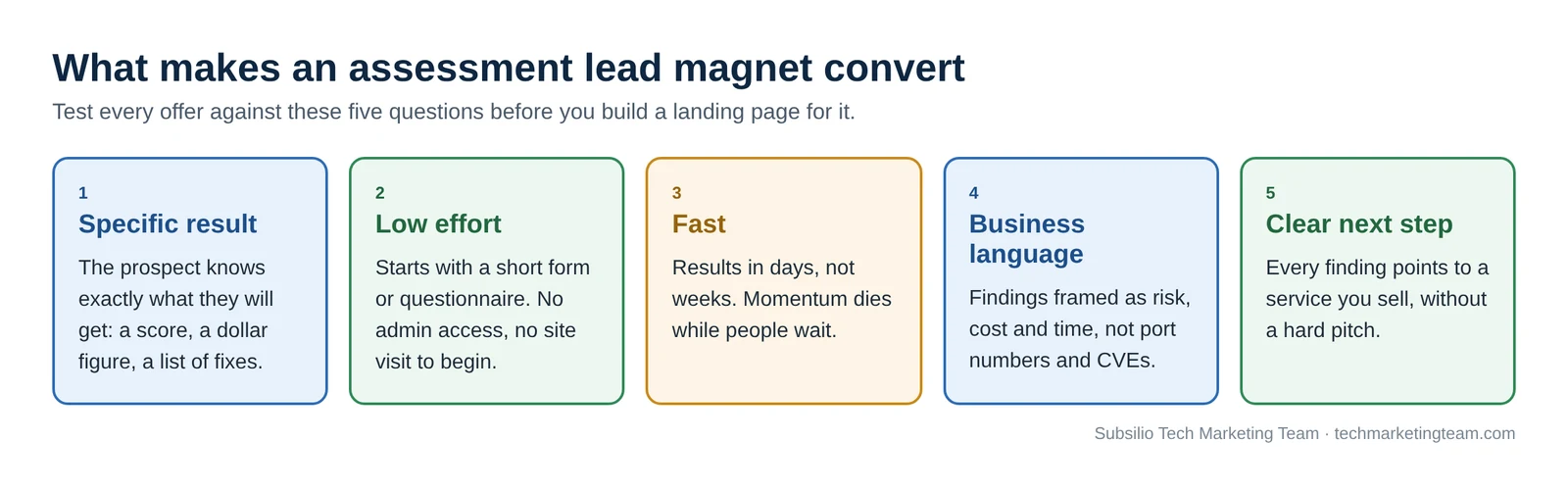
If an offer fails two or more of these, rework it before you promote it.
| Question | Weak answer | Strong answer |
|---|---|---|
| What will I get? | “An assessment of your IT” | “A security score out of 100 and your top three fixes” |
| What do I have to do? | Give admin access, book a site visit | Answer 12 questions, enter your domain |
| How long will it take? | Not stated | “10 minutes to start, report in 3 business days” |
| Will I understand it? | Technical scan output | Plain-English report with a summary page |
| What happens next? | Unclear, or a hard sell | Optional 30-minute walkthrough with an engineer |
Five assessment lead magnets that work better
Each of these produces a specific result, starts with little or no system access, and leads naturally to a service you already sell. You don’t need all five. Pick the two that best match your ideal client and your strongest services.
1. Cybersecurity vulnerability scorecard
Who it’s for: owners and managers of small and mid-sized businesses who know security matters but have no way to measure it.
How it works: the prospect answers a short questionnaire (MFA, backups, staff training, device management) and enters their domain. You add checks that need no access: email authentication records (SPF, DKIM, DMARC), publicly exposed services, website security headers and known breached credentials for their domain.
What they get: a score or grade, a one-page summary, and the top three fixes ranked by risk. Basing your questions on a recognised framework such as the CIS Controls Implementation Group 1 makes the score more credible and easier to explain.
Watch out for: scare tactics. A red “F” with no explanation feels like manipulation. Explain each finding in one sentence and say what it would take to fix.
2. Microsoft 365 licence and security check
Who it’s for: businesses with 20 or more Microsoft 365 users, and the finance people who pay the bill.
How it works: with a read-only report export (or a short guided call), you review licence assignments, unused or duplicate licences, plan tiers that don’t match how people work, and basic security settings. The Microsoft Secure Score in their admin centre gives a useful, vendor-neutral starting point.
What they get: an estimated monthly saving, a list of security settings that are off, and a simple action plan.
Why it converts: it leads with money saved, not risk. That makes it easy for an office manager to forward to the owner or CFO.
3. Cloud cost and architecture review
Who it’s for: growing firms with Azure or AWS workloads that “just grew” without a plan, often in the mid-market.
How it works: using billing exports and read-only access, you look for idle resources, oversized machines, missing backups and single points of failure.
What they get: a cost-saving estimate and a short list of resilience risks. This one suits MSPs with real cloud engineering depth. Don’t offer it if you can’t deliver it well.
4. Backup and recovery readiness check
Who it’s for: any business that says “we have backups” but has never tested a restore.
How it works: a short questionnaire on what is backed up, where, how often and when it was last restored. You can offer a supervised test restore of one file or system as an optional second step.
What they get: a plain answer to “If we were hit tomorrow, how long would we be down?” That question lands with owners in a way “backup audit” never does.
5. IT cost and downtime calculator
Who it’s for: early-stage researchers who aren’t ready to talk to anyone yet.
How it works: an interactive page where visitors enter staff numbers, average wages and current IT spend to estimate the cost of an hour of downtime or the true cost of in-house IT.
What they get: an instant number, with the option to email themselves a fuller breakdown. It captures people earlier in the journey and gives your sales team useful context.
| Lead magnet | Best-fit buyer | Effort for prospect | Natural next service |
|---|---|---|---|
| Security scorecard | SMB owner, office manager | Low | Managed security, EDR, training |
| Microsoft 365 check | Office manager, CFO | Low to medium | Managed IT, M365 management |
| Cloud cost review | Mid-market IT lead, CFO | Medium | Cloud management, projects |
| Backup readiness check | Owner, operations lead | Low | Backup and disaster recovery |
| Cost / downtime calculator | Early researcher | Very low | Nurture emails, then any of the above |
Build a dedicated landing page for each offer
A lead magnet hidden in a sidebar will underperform. Each offer needs its own page, so it can rank for its own searches (for example “free cybersecurity assessment Denver” or “Microsoft 365 licence audit”) and answer that buyer’s doubts.
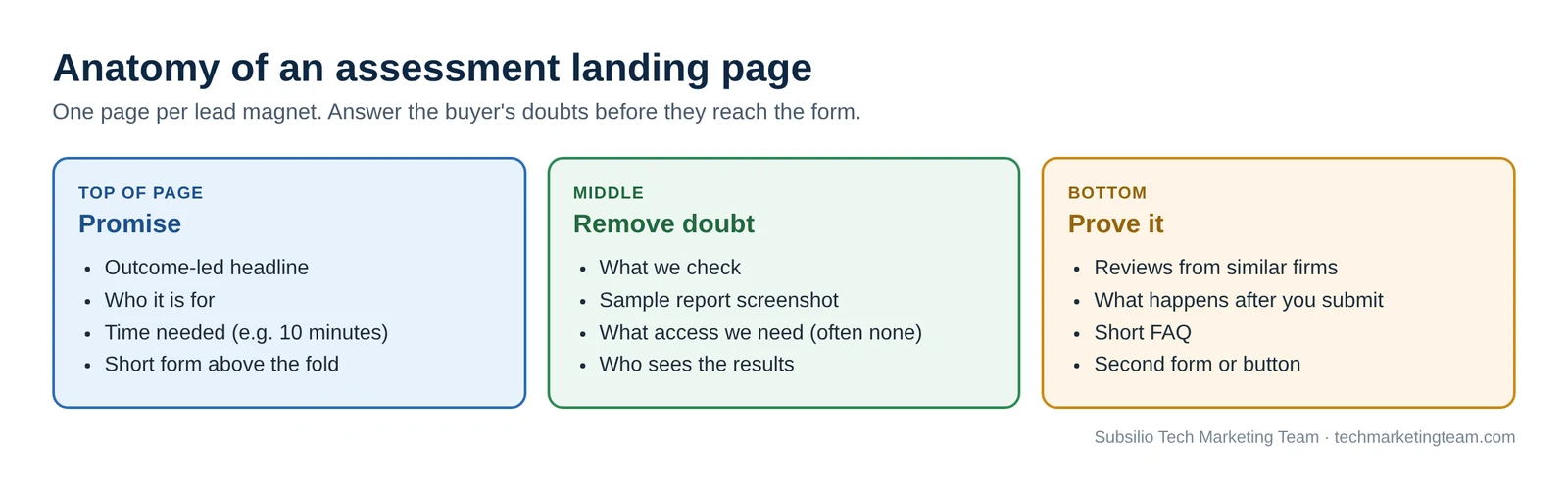
Show a sample report. It is the single most persuasive element on the page.
- Keep the form short. Name, work email, company and one qualifying question (such as number of staff) is usually enough.
- Say what access you need. “No software install, no admin access” removes a big objection.
- Say who sees the results. Prospects worry their weaknesses will be shared or used against them.
- Add proof from similar businesses. A short review wall near the form helps. See review walls and trust sections for MSP websites.
For layout, speed and form design, our high-converting websites service applies the same principles across MSP sites.
The review call is where you win the client
Sending a PDF and waiting is the most common way MSPs waste good leads. The report gets the meeting; the meeting gets the client.
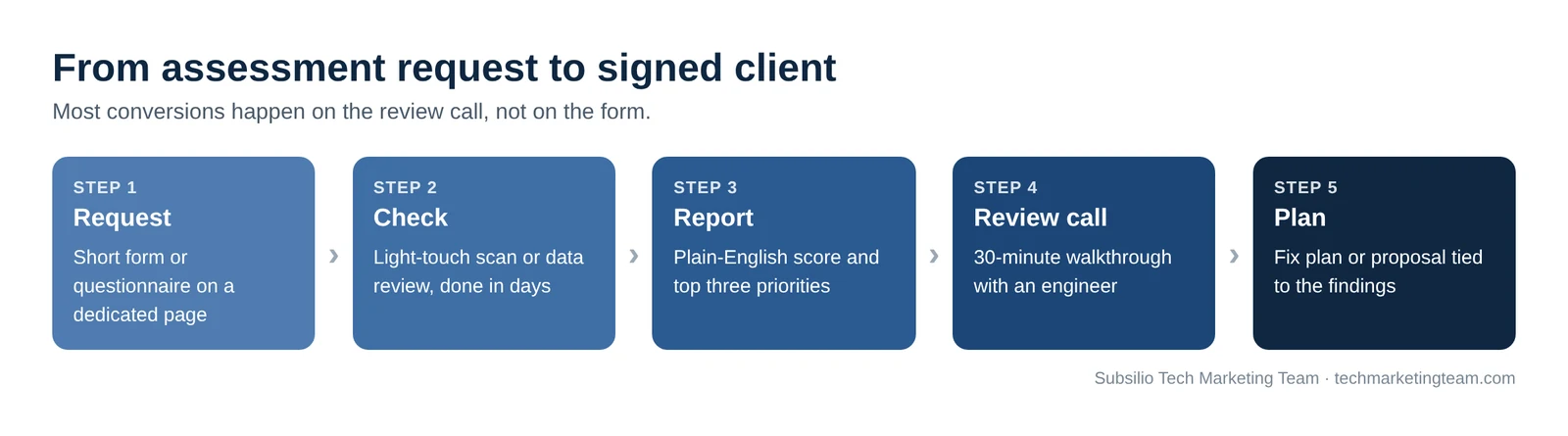
Book the review call at the moment the report is delivered, not after.
- Offer the call when you deliver the report. “Here’s your report. Want 30 minutes with the engineer who reviewed it?”
- Put an engineer on the call, not just a salesperson. Prospects trust the person who found the issues.
- Cover the top three findings only. Give one quick win they can fix themselves today. It builds trust fast.
- Then explain what fixing the rest would involve. Scope, time and rough cost. No pressure.
- Follow up in writing within 24 hours with a short plan and a clear next step.
If the prospect doesn’t book a call, follow up with two or three short, useful emails over the next few weeks: one explaining a finding in more detail, one short case study, and one simple check-in.
How to promote your lead magnets
- Search. Build each landing page around a real search phrase and link to it from related service pages and blog posts. Our MSP SEO services cover this mapping.
- Google Ads. Assessment pages make good ad destinations for high-intent searches, because they offer a lower-commitment next step than “book a call.” See our digital ads services.
- LinkedIn. Share anonymised findings (“The most common gap we found in 20 law firm scorecards this quarter…”) with a link to the scorecard. Our social media services can help.
- Local partners. Insurance brokers and accountants can recommend a security scorecard to their own clients. See referral co-marketing for MSPs.
- Content. Mention the relevant assessment at the end of related posts, in context. Content briefs by buyer stage help you place each offer at the right point.
How to measure results
Don’t judge a lead magnet on form fills alone. Track each step, so you can see exactly where people drop off:
| Stage | What to track | If it’s low, check |
|---|---|---|
| Landing page | Visit-to-request rate | Headline, form length, proof |
| Request | Requests completed (questionnaire finished) | Questionnaire length, reminders |
| Report | Report-to-call rate | When and how the call is offered |
| Call | Call-to-proposal rate | Who runs the call, how findings are framed |
| Proposal | Proposal-to-client rate | Scope, price, follow-up speed |
Set up these steps as conversions in GA4 and in your CRM. Our guide to measuring MSP SEO and AI visibility with GSC and GA4 explains how. Use your own numbers as the baseline and improve one stage at a time.
Common mistakes to avoid
- Offering five lead magnets at once and promoting none of them properly
- Asking for admin access before you have earned any trust
- Sending a 40-page automated scan report nobody will read
- Letting a salesperson run the review call alone
- Using fear-based language that makes the prospect feel judged
- Promising an assessment you can’t deliver within a few days
Final thoughts
The free network audit isn’t dead because assessments stopped working. It’s dying because it promises nothing specific. Replace it with one or two focused assessments that give a clear result, start with little effort and lead naturally to your services. Then treat the review call as the real conversion point.
Subsilio Tech Marketing Team builds lead magnet landing pages, campaigns and follow-up sequences for MSPs and IT companies. Book a free strategy call and we’ll look at which assessment fits your ideal client best.
Frequently Asked Questions
What is a lead magnet for an MSP?
A lead magnet is something useful an MSP offers in exchange for a prospect’s contact details, such as a security scorecard, a Microsoft 365 licence check or a backup readiness report. The best ones give a clear result even if the prospect never becomes a client.
Do free network assessments still work for MSPs?
They can, but generic “free network assessment” offers usually convert poorly because the result is vague and they feel like a sales tactic. Specific assessments with a clear output, such as a security score or a savings estimate, tend to perform better.
What is the best lead magnet for an MSP?
For most MSPs serving small businesses, a cybersecurity scorecard or a Microsoft 365 licence and security check works best. Both need little access, produce a clear result and lead naturally to managed services.
How much access should an MSP ask for during a free assessment?
As little as possible to start. Use questionnaires and external checks first. Ask for read-only access or a guided session only after the prospect has seen value and agreed to go deeper.
Should an MSP charge for assessments?
Light-touch assessments work well as free lead magnets. Deeper assessments that take an engineer several hours are often better as a paid, fixed-fee offer, which also attracts more serious buyers.
How do you follow up after an MSP assessment?
Offer a 30-minute review call with the engineer at the moment you send the report. Cover the top three findings, give one quick win, explain what a full fix involves, and send a short written plan within 24 hours.
How long should an assessment take to deliver?
Aim for a few business days. Interest drops quickly while people wait, so set the delivery time on the landing page and meet it.