



Most MSP websites get redesigned for the right reasons and rebuilt in a way that quietly destroys years of search visibility. The pattern is consistent enough to predict: the new site launches, everyone agrees it looks far better, and eight to twelve weeks later somebody notices that organic enquiries have halved. By then the cause is buried under a hundred changes and nobody can say which one did the damage.
The uncomfortable part is that this is almost never a design problem. It is a handover problem. The people who build MSP websites are usually measured on how the site looks and how quickly it ships, not on whether it holds its rankings. Search visibility is the responsibility that falls between the designer, the developer and the marketing lead, and so nobody owns it.
This guide covers what to protect, in what order, and what to do on the days either side of launch. It assumes you are replatforming or substantially rebuilding, not changing a colour scheme. If you are planning the structure of the new site from scratch, read it alongside our guide to MSP website architecture, which covers how the pages should be organised once you have decided what survives.
Why MSP redesigns lose more visibility than other industries
Three characteristics of IT provider websites make them unusually fragile during a rebuild.
Their rankings are concentrated in a handful of pages. A typical MSP earns most of its organic enquiries from four or five URLs: managed IT services, cybersecurity, one or two city pages, and occasionally a single blog post that happens to rank well. Lose one of those in a migration and you have not lost five per cent of your traffic, you have lost a third of it.
The rebuild usually involves consolidation. Redesigns are often triggered by a site that has sprawled. The instinct is to tidy up, which means merging six service pages into two and deleting “thin” pages. Some of those thin pages are ranking. Consolidation is frequently correct, but it needs to be a deliberate decision with redirects, not a cleanup.
Nobody has a baseline. Most MSPs cannot say what their organic traffic was before the redesign because nobody exported it. Without a baseline, you cannot tell a normal post-migration dip from a genuine loss, which means you cannot tell whether to act.
Before you touch anything: capture the baseline
Do this before a single page is built. It takes an afternoon and it is the difference between diagnosing a problem in week two and arguing about it in month three.
| What to capture | Where from | Why it matters |
|---|---|---|
| Full URL list of the live site | Crawl the site and export the XML sitemap | This becomes your redirect map. Without it you are guessing |
| Top 100 pages by organic clicks, 12 months | Search Console, Pages report | Your protected list. Nothing here gets deleted without a decision |
| Top 200 queries by clicks and impressions | Search Console, Queries report | Lets you spot which specific terms drop, not just total traffic |
| Current indexed page count | Search Console, Pages (Indexing) report | A sharp change post-launch is the earliest warning signal |
| Existing title tags and meta descriptions | Site crawl export | Many redesigns rewrite these for no reason and lose established relevance |
| Current conversion baseline | GA4 and your call tracking | Traffic can hold while forms quietly break. Track both |
| Core Web Vitals on key pages | Search Console, Core Web Vitals report | So you can prove the new site is faster, or find out it is not |
| Backlink profile with target URLs | Any link index you use | Tells you which URLs carry external equity and must not be retired |
| Existing structured data | Crawl or a validator | Schema is routinely dropped in rebuilds and rarely noticed |
Export all of it to files you keep. Search Console holds sixteen months of data, so the comparison window you will want in six months is disappearing as you read this.
The URL decision: keep, redirect or retire
Every URL on the old site falls into one of three buckets. Working through this list is the single highest-value hour in the whole project.
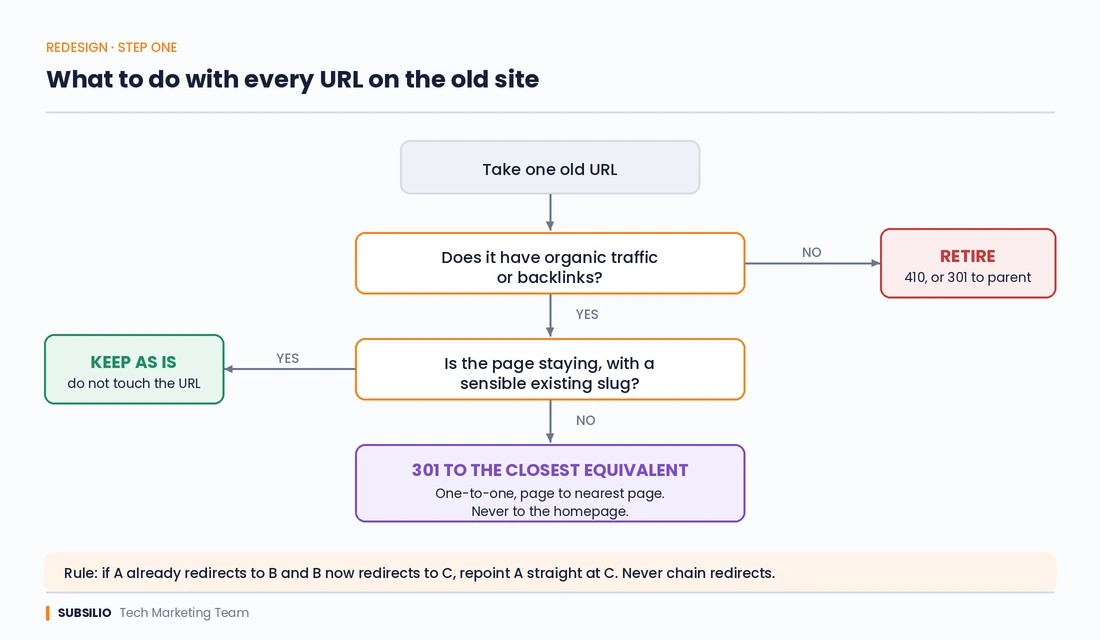
Decision tree showing whether to keep, 301 redirect or retire each URL during an MSP website redesign.
Keep the URL unchanged. The default for anything with traffic, links or both. If the page is staying and the slug is sensible, do not change it. “Improving” a URL from /managed-it-services/ to /services/managed-it-support-denver/ costs you a redirect hop, a re-crawl cycle and a portion of the equity, and buys you almost nothing. URL keywords are a weak signal. Continuity is not.
Redirect to the closest equivalent. For pages that are being merged, renamed or restructured. The rule is one-to-one, page to nearest page. A 301 to a genuinely equivalent page passes most of its value. A 301 to a vaguely related page passes less. A 301 to the homepage passes almost nothing and is the most common mistake in the whole process.
Retire with a 410 or a redirect to the parent. Reserved for pages with no traffic, no links and no purpose: old event pages, duplicated drafts, the sample page nobody deleted. Be honest about what qualifies. A page with low traffic is not the same as a page with no value, particularly if it holds external links.
Two rules that catch most of the damage:
- Never chain redirects. If A redirected to B two years ago and B now redirects to C, update A to point at C directly. Chains dilute and occasionally break.
- Never redirect everything to the homepage. If you take one thing from this article, take that.
Google’s site move documentation covers the mechanics in detail and is worth reading in full if you are also changing domain or protocol.
Content: what you cannot afford to simplify
Design refreshes have a strong pull toward less text. Bigger imagery, shorter paragraphs, more whitespace. Visually this is usually an improvement. For search it can be a self-inflicted wound.
The pages that rank for commercial MSP terms rank because they answer things. If your current managed IT services page runs 1,400 words covering what is included, what is not, how onboarding works and what response times mean in practice, and the new version is 300 words of positioning statements over a hero image, you have removed the reason the page ranked.
The resolution is not to keep the wall of text. It is to keep the substance and present it better: accordions, tabs, structured sections, tables. Content inside an accordion that is present in the HTML on page load is fully indexable. Content loaded only after a user clicks, via a separate request, frequently is not. Ask your developer which one they have built, and verify it by viewing the rendered source rather than taking the answer on trust.
The same applies to the detail that makes your service pages credible in the first place. Our guide to managed IT services pages that explain outcomes, not jargon covers what belongs on those pages, and a redesign is a poor reason to remove any of it.
Staging site rules
Staging sites get indexed more often than most agencies admit, and a duplicate copy of your entire website in Google’s index is a genuine problem that outlives the project.
- Password-protect the staging environment at server level. HTTP authentication, not a plugin.
- Do not rely on Disallow in robots.txt alone. It prevents crawling, not indexing, and a staged URL that picks up an external link can still surface.
- Apply noindex headers across the entire staging environment as a second layer.
- Use a subdomain or separate host you control, and delete it entirely once the migration is finished.
- Before launch, check that the staging
noindexhas been removed from production. This is the single most common catastrophic launch error in web development. A site that ships with a site-wide noindex disappears from Google within days, and the symptom looks identical to a penalty.
Launch day checklist
Work through this in order on the day the new site goes live.
- Confirm robots.txt on production allows crawling and does not carry over any staging rules.
- Confirm no noindex tag or X-Robots-Tag header on any page that should rank. Check the HTTP headers, not just the HTML.
- Test every redirect in your map. Not a sample. Every one. A crawler will do it in minutes.
- Verify canonical tags point to the live, correct, self-referencing URL, and that they use the same protocol and www convention as the rest of the site.
- Submit the new XML sitemap in Search Console, and leave the old sitemap accessible for a few weeks so Google re-crawls the old URLs and discovers the redirects.
- Confirm GA4, call tracking and form tracking are firing. Submit a real test form and a real test call.
- Re-implement structured data. LocalBusiness, Organization, Service and any review markup. Our MSP schema markup guide covers what an IT provider actually needs.
- Check that your Google Business Profile website link still resolves to a live page, not a redirect chain.
- Run a crawl of the live site and look for 404s, redirect loops, missing title tags and orphaned pages.
- Test the primary conversion path on a phone, on mobile data, as a stranger would.
The first 90 days
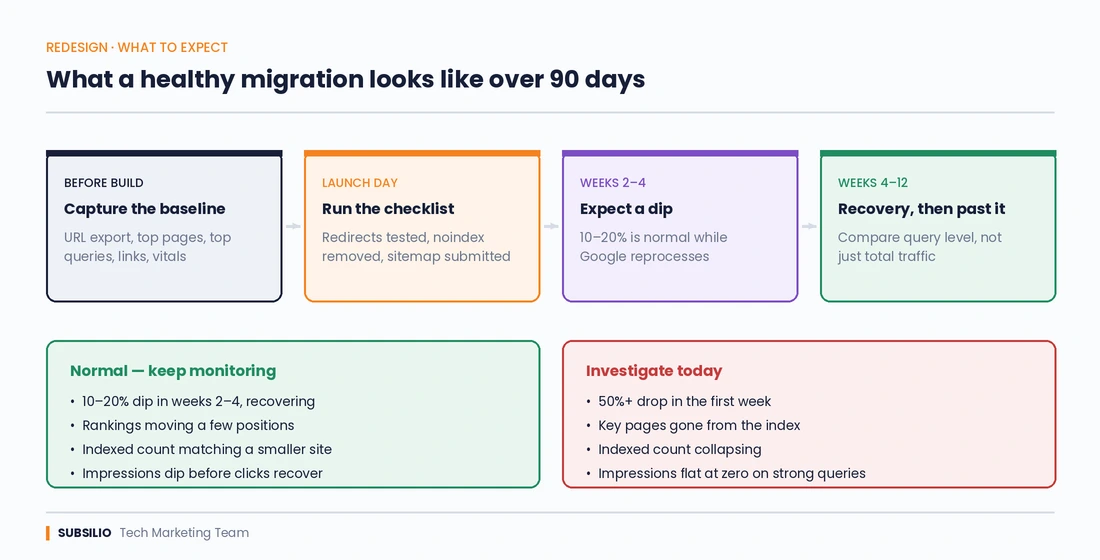
Timeline of a healthy MSP website migration across 90 days, comparing a normal traffic dip with signs that need investigation.
Week 1. Check Search Console daily for crawl errors and coverage changes. Expect a rise in crawl activity as Google reprocesses. Watch the Pages report for a jump in “Not found” errors, which usually means a gap in the redirect map.
Weeks 2 to 4. Expect a dip. A migration that changes URLs typically costs visibility for several weeks while Google reprocesses and reassigns signals. A dip is normal. A cliff is not.
Weeks 4 to 12. Traffic should be recovering toward the baseline and then past it. Compare query-level data against the export you took, not just the headline traffic number, because the average can hide a specific ranking loss behind a general uplift.
The distinction that matters:
| Normal | Investigate immediately |
|---|---|
| 10 to 20 per cent dip in weeks 2 to 4, recovering | 50 per cent or more drop in the first week |
| Rankings fluctuating within a few positions | Specific high-value pages vanishing from the index |
| Indexed page count changing to reflect a deliberately smaller site | Indexed count collapsing with no corresponding change in page count |
| Impressions dipping before clicks recover | Impressions flat at zero on previously strong queries |
Our guide to measuring MSP SEO and AI visibility with GSC and GA4 covers how to build the views that make these comparisons quick rather than a monthly archaeology exercise.
What redesigns break that nobody checks
A short list of the failures that cause the most damage relative to how easy they are to prevent.
- Form submissions that go nowhere. New form plugin, unverified email routing. Traffic is fine, leads are zero, and the first person to notice is the owner asking why the phone has stopped.
- Tracking that never got reinstalled. The GA4 tag was in the old theme’s header. The new theme has a different header.
- The phone number changed format. If it stopped matching your Google Business Profile and your citations exactly, your local consistency signal has weakened.
- Images renamed and alt text dropped. Image search is a small but real traffic source for service businesses, and alt text is an accessibility requirement regardless.
- Page speed regression. Heavier hero images, more scripts, an animation library. A site that scores worse on Core Web Vitals than the one it replaced is a rebuild that moved backwards.
- Blog URLs restructured. Adding /blog/ in front of every post URL feels tidy and breaks every existing link to your articles unless every one is redirected.
The honest scoping conversation
If you are commissioning a redesign, ask the person building it three questions before you sign anything:
- Who is producing the redirect map, and is it in the quote?
- Who is monitoring search performance for 90 days after launch, and what happens if it drops?
- Which currently ranking pages are you planning to remove or merge, and on what evidence?
If the answers are vague, the search consequences are being left to chance. A rebuild that looks better and earns fewer enquiries is not an improvement, and it is a far more common outcome than the industry admits.
Planning a rebuild?
We handle MSP website rebuilds where search visibility is part of the scope rather than an afterthought, including redirect mapping, pre-launch auditing and post-launch monitoring.
Explore our high-converting websites service and our MSP SEO services, or book a free strategy call to review your current site before anything gets rebuilt.
How long does it take to recover search rankings after a website redesign?
Most well-executed migrations recover to baseline within four to twelve weeks. A dip of 10 to 20 per cent in the first two to four weeks is normal while Google reprocesses the new URLs. Recovery beyond twelve weeks usually indicates a genuine problem, most often an incomplete redirect map, removed content, or a technical directive such as a leftover noindex blocking indexation.
Will changing my MSP website URLs hurt my SEO?
Changing URLs carries risk that proper 301 redirects largely mitigate, but the safest choice is not to change URLs that are already working. If a page has traffic, backlinks and a sensible slug, keep it exactly as it is. Change URLs only where the structure is genuinely broken, and map every old URL to its closest equivalent rather than to the homepage.
Should I redirect old pages to the homepage during a redesign?
No. A blanket redirect to the homepage discards the page-level relevance signals those URLs carried, and Google frequently treats it as equivalent to a soft 404. Map each old URL to the most closely equivalent page on the new site. Where no equivalent exists and the page has no value, return a 410 rather than redirecting it somewhere irrelevant.
How do I stop my staging site from being indexed by Google?
Use HTTP authentication at server level so the environment cannot be crawled at all, and apply noindex headers as a second layer. Do not rely on robots.txt alone, because it blocks crawling rather than indexing, and a staging URL that picks up an external link can still appear in results. Delete the staging environment once the migration is complete.
What should an MSP measure before redesigning its website?
At minimum: a full URL export, your top 100 pages and top 200 queries by organic clicks over the last twelve months, current indexed page count, existing title tags and meta descriptions, your backlink profile mapped to target URLs, Core Web Vitals on key pages, and your current conversion rate from organic traffic. Export all of it before work begins, because Search Console only retains sixteen months of history.
Can a website redesign improve SEO rather than damage it?
Yes, and it frequently should. A rebuild that improves site speed, fixes a confused information architecture, strengthens internal linking, adds structured data and expands thin service pages will usually outperform the site it replaced within a few months. The uplift comes from those specific improvements, not from the redesign itself. A visually better site with the same underlying content and structure will perform roughly the same.
Do I need to resubmit my sitemap after launching a new website?
Yes. Submit the new XML sitemap in Search Console on launch day, and keep the old sitemap accessible for several weeks. Leaving the old sitemap live encourages Google to re-crawl the previous URLs and discover the redirects sooner, which shortens the reprocessing period.
Why did my MSP website traffic drop after a redesign?
The most frequent causes, in rough order of likelihood: a missing or incomplete redirect map, a noindex directive carried over from staging, ranking content removed during a content “cleanup”, URL changes made without redirects, blocked crawling in robots.txt, and page speed regression. Check for a site-wide noindex first, because it is both the most damaging and the fastest to fix.