



There is a version of this problem for MSPs with one office, and there is a much harder version for MSPs with several. They are not the same problem, and applying the single-office playbook to a multi-location firm produces predictable damage: cannibalised rankings, duplicate Google Business Profiles competing with each other, and a site structure that nobody, including your own sales team, can navigate.
The multi-location version is also increasingly common, because of how MSPs grow. Most did not open offices one at a time from a strategic plan. They acquired other MSPs, inherited their websites, their brands, their Google listings and their local reputations, and then had to work out what to do with all of it. Consolidation is the real question, and almost nothing written about local SEO addresses it.
This guide covers the structural decisions specific to multi-location MSPs: distinguishing genuine locations from service areas, URL architecture across cities and services, handling acquired brands and their existing rankings, per-location proof and staffing, schema for multiple offices, and where the ceiling sits on how many cities you should target at all.
If you have one office and are targeting surrounding towns, start instead with our guide to service-area pages for MSPs without doorway-page spam, which covers the single-location case in depth, and this article assumes it.
The distinction that determines everything: office or service area?
Before any URL decisions, classify every city you serve into one of two categories. Getting this wrong is the root cause of most multi-location MSP problems.
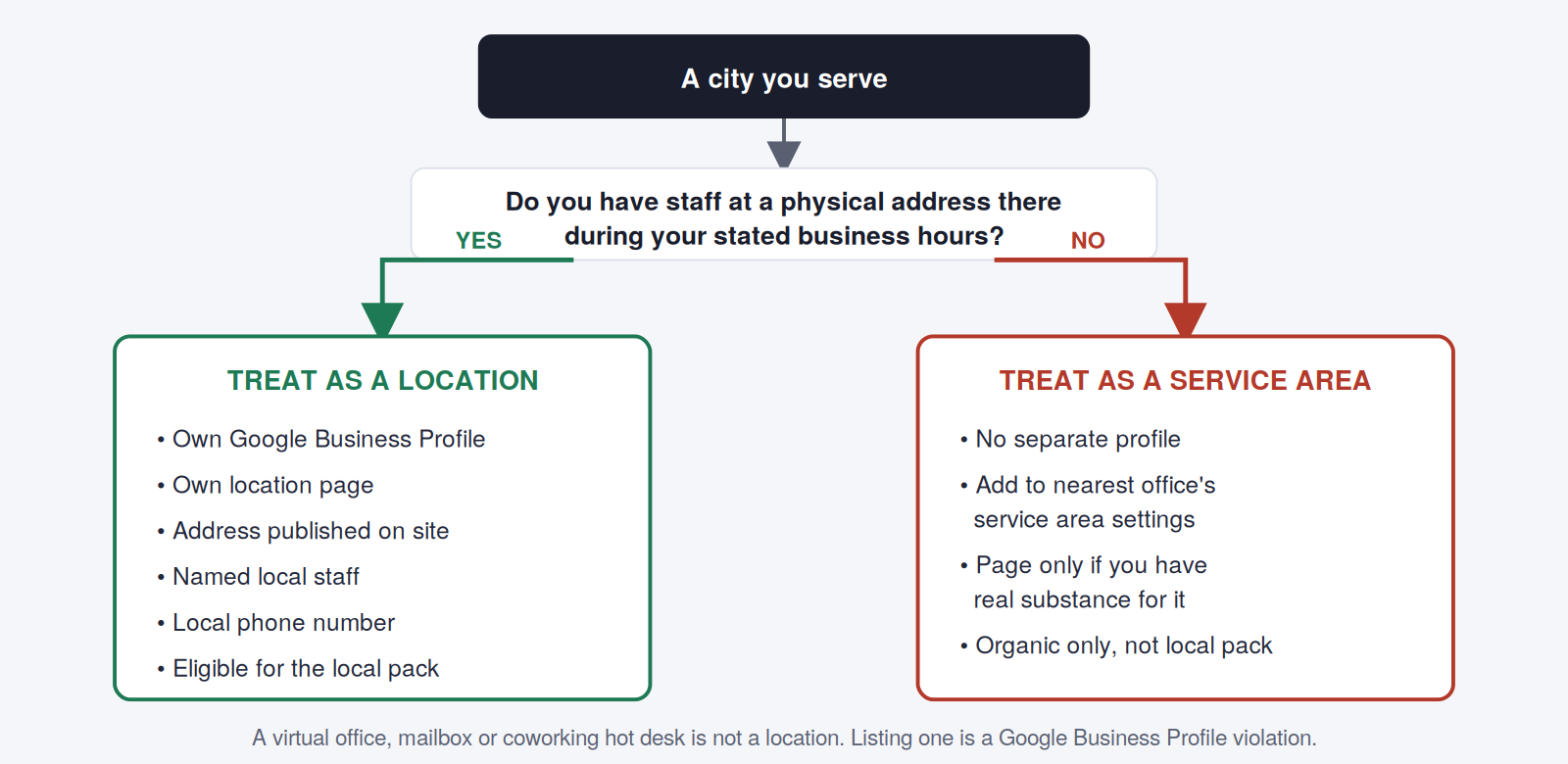
The temptation to register profiles at virtual offices or mail-forwarding addresses is strong and the practice is common in this industry. It is also a clear guidelines violation, and profiles get suspended for it, sometimes years later, sometimes taking legitimate profiles down with them. If you inherited any through an acquisition, deal with them before you build anything on top.
URL architecture across cities and services
A multi-location MSP has two dimensions to organise (locations and services) and the naive approach multiplies them. Five cities times six services is thirty near-identical pages, which is a duplication problem rather than a coverage strategy.
The structure that holds up:
/locations/                          ← hub listing all offices
/locations/denver/                   ← office page: address, team, hours
/locations/colorado-springs/
/locations/fort-collins/
/services/managed-it/                ← canonical service page
/services/cybersecurity/
/services/cloud/
/it-support-denver/                  ← city + primary service only
/it-support-colorado-springs/
/cybersecurity-denver/               ← only where demand justifies it
Three principles are doing the work here.
Location pages and city service pages do different jobs. A location page is about the office: where it is, who works there, what the hours are, how to get there. It supports your Google Business Profile and serves people who already know you. A city service page targets a commercial query and serves people who do not. Merging them produces a page that does neither well.
Not every service needs a page in every city. Create a city service page only where there is real search demand and you have genuinely city-specific substance. For most MSPs this means a city page for your primary service in every real location, and secondary service pages only in your largest one or two markets.
Keep URLs shallow and stable. Deep nesting like /locations/colorado/denver/services/cybersecurity/ creates fragile, ugly URLs. Two levels is enough.
What makes a city page substantive rather than a template
The bar is straightforward: a city page must contain material that could not appear on any other city’s page. Applied honestly, that rules out most of what MSPs currently publish on these pages.
| Does not count as local content | Does count |
|---|---|
| The city name inserted into generic service copy | Named engineers based at that office, with photos and credentials |
| A paragraph of city history or population data | Reviews from clients in that city, displayed on the page |
| An embedded map with no other local content | Response commitments specific to that area, including drive times |
| A list of neighbourhoods you serve | Anonymised outcomes from local clients |
| “We proudly serve businesses in (City)” | Industry concentrations you actually serve there, different in a government town versus a manufacturing one |
| Copy-pasted testimonials from other markets | Local compliance or regulatory context that genuinely differs |
| The same FAQ block across every city | Local partnerships, memberships and community involvement |
The right-hand column is harder to produce, and that difficulty is the entire point. It is also a useful business signal: if you cannot fill a city page with genuine local substance, you probably do not have a real presence in that city yet, and a page claiming otherwise will convert badly even if it ranks.
The test: remove the city name from the page. If the remaining content would work unchanged for any other city, it is a template, not a location page, and Google’s spam policies treat that pattern as doorway pages.
The acquisition problem
This is the multi-location scenario nobody writes about, and it is how most MSPs became multi-location in the first place.
You acquire a firm in another city. It has a website with a decade of accumulated rankings, a Google Business Profile with 80 reviews, and a brand that local businesses recognise. You now have to decide what to do with all of it, and the wrong choice can destroy real, hard-won local visibility.
The three viable options
Full migration. Redirect the acquired site into yours page by page, move the location under your brand, and update the Google Business Profile name over time. Cleanest long-term and the right default. Expect a visibility dip for several months while Google reprocesses. Never redirect everything to your homepage: map each meaningful page to its closest equivalent, or the signals are lost.
Staged migration. Keep the acquired site live under its own brand for 12 to 24 months while transitioning the client base, then migrate. Right when the acquired brand carries significant local trust and an abrupt change would unsettle clients. The cost is running two sites and being scrupulous about not duplicating content between them.
Deliberate multi-brand. Keep both permanently as genuinely separate businesses. Occasionally correct (different market segments, different service models) but usually it is a decision that got deferred rather than made, and the ongoing cost is real.
Acquisition mistakes that cost visibility
Deleting the acquired Google Business Profile. Those reviews are frequently the most valuable asset you bought. Update the profile gradually instead: Google supports business name changes on an existing profile, and the review history carries forward.
Redirecting the whole acquired site to your homepage. A blanket redirect discards the page-level relevance signals you paid for. Map page to page.
Publishing the acquired site’s content on your site while it is still live. Two live copies competing is a self-inflicted duplication problem. Migrate, then redirect.
Changing the local phone number immediately. Keep it live and forwarded. It appears in years of local citations, directories and client contact lists.
Losing the NAP trail. Every citation pointing at the old name, address or number needs updating, and inconsistency across them actively suppresses local rankings.
Google Business Profile across multiple locations
Each genuine office needs its own profile, and each needs to be treated as a live asset rather than a listing.
- Use consistent naming. Your business name plus, where necessary, the location, matching your real-world signage. Do not stuff keywords into the name field; it is one of the most-reported violations and one of the most likely to trigger a suspension.
- Local phone numbers per location. A single central number across all profiles weakens local signals and confuses callers.
- Point each profile at its own location page, never all at the homepage.
- Set service areas per office, keeping them realistic. Overlapping service areas between two of your own offices creates internal competition for the same searches.
- Collect reviews per location. This is the hardest part operationally and the most valuable. A location with four reviews will not compete with a local firm that has sixty, regardless of your site structure.
- Keep hours, holidays and photos current per profile, not just at head office.
Our Google Business Profile operating checklist for MSPs covers the ongoing maintenance in detail, and it applies per location rather than per company.
Schema for multiple locations
Mark up each location page with its own LocalBusiness entity, linked to your parent Organization. The key details:
- Each location gets a distinct @id and its own complete address, phone and opening hours
- Use parentOrganization to connect each location to the parent brand
- Include areaServed for the surrounding towns that office covers
- Keep the values identical to what is visible on the page and on the Google Business Profile, since mismatches undermine the whole point
Google’s local business structured data documentation covers the required and recommended properties. Our MSP schema markup guide works through the implementation for IT providers specifically, including the multi-location case.
Internal linking and cannibalisation
Multi-location sites cannibalise themselves more than any other structure, because five pages about IT support differ only by city name and Google has to decide which one answers a given query.
Four measures keep it under control:
Wire the hub properly. A location hub links to every location page; each location page links back to the hub and across to its city service pages. Every page should be reachable from the main navigation within two clicks.
Differentiate title tags and H1s by more than the city name. If your five pages are identical apart from one word, expect Google to treat them as near-duplicates. Vary the framing, and let each reflect what is genuinely distinct about that market.
Point external links at the right city page. A chamber link in Colorado Springs should land on the Colorado Springs page, not the homepage. This is one of the strongest differentiating signals available to you, and it is covered in our guide to local link building for MSPs.
Monitor for it in Search Console. Filter the performance report by query, look at which page ranks, and watch for pages swapping positions on the same term, the classic cannibalisation signature. Our guide to measuring MSP SEO and AI visibility covers setting these views up.
The wider structural picture, how location pages sit alongside your service architecture, is covered in MSP website architecture.
How many cities is too many?
The honest answer most MSPs do not want: fewer than you are currently targeting.
A reasonable ceiling is the number of cities where you can maintain a real presence, meaning staff or genuine coverage, local reviews, local clients you can reference, and enough substance to fill a page that survives the city-name-removal test. For most MSPs that is three to six markets, not twenty.
The failure mode is publishing forty city pages, ranking for none of them, and diluting the authority that could have made three or four genuinely competitive. Depth beats breadth in local search, and it is not close.
If you want to expand into a market where you have no presence yet, the sequence that works is: win clients there first through referral, partnership or paid channels; collect reviews from those clients; then build the page around real evidence. A page built before the presence exists is a claim you cannot support, and it will not rank against firms who can.
The summary
Multi-location MSP SEO is mostly a discipline problem rather than a technical one. The technical parts (URL structure, schema, internal links) are solved problems with known answers. The hard part is classifying honestly which cities are real locations, resisting the urge to multiply pages you cannot fill, and treating acquired brands and their local reputations as assets to be protected rather than absorbed carelessly.
MSPs who get this right end up with fewer pages than their competitors and better rankings in the markets that actually matter to them. That is the trade worth making.
Multiple offices, or just finished an acquisition?
We handle multi-location structure, migrations and local visibility for IT providers and MSPs, including consolidating acquired brands without losing the rankings and reviews you paid for.
Book a free strategy call or explore our MSP SEO services.
Should a multi-location MSP have one website or several?
One website with well-structured location pages is right in almost every case. Separate sites per location split your authority, multiply maintenance, and create duplicate content risk between your own properties. The main exception is a genuinely distinct business (different market segment, different service model, different brand promise) rather than simply a different city. If you have inherited multiple sites through acquisition, plan a migration rather than accepting the situation permanently.
What is the difference between a location page and a city service page?
A location page is about an office: address, team, hours, directions, local reviews. It supports your Google Business Profile and serves people who already know you. A city service page targets a commercial query such as “IT support in (city)” and serves people who do not yet know you. They need different content and different calls to action, and merging them produces a page that does neither job well.
Can an MSP create a Google Business Profile for a virtual office?
No. A profile requires staff present at the address during stated business hours. Virtual offices, mailboxes and coworking hot desks do not qualify, and profiles created at such addresses are regularly suspended, sometimes years after creation, and sometimes taking legitimate profiles down with them. If you have inherited any through an acquisition, resolve them before building further local strategy on top.
What should happen to an acquired MSP's website after a merger?
In most cases, migrate it into your site with page-level redirects mapping each meaningful URL to its closest equivalent, rather than redirecting everything to your homepage. Keep the acquired Google Business Profile and update its name gradually so the review history is preserved, keep the local phone number live and forwarded, and update every citation carrying the old details. A staged migration over 12 to 24 months is reasonable where the acquired brand carries significant local trust.
How many city pages should an MSP have?
Only as many as you can fill with genuinely distinct content and support with real local evidence, typically three to six markets for most MSPs. The common failure is publishing dozens of city pages, ranking for none, and diluting authority that could have made a handful genuinely competitive. Depth in a few markets consistently beats breadth across many in local search.
How do I stop my location pages competing with each other in Google?
Give each page genuinely different content beyond the city name, vary title tags and H1s by more than one word, build a proper hub-and-spoke internal linking structure, and point external local links at the relevant city page rather than the homepage. Monitor for the classic signature in Search Console: two of your pages swapping positions on the same query over time.
Do I need separate schema markup for each MSP office?
Yes. Each location page should carry its own LocalBusiness entity with a distinct identifier, its own complete address, phone number and opening hours, and a parentOrganization property connecting it to your main brand. Include the surrounding towns each office covers as areaServed. Keep every value identical to what appears on the page and on the corresponding Google Business Profile.
Should each MSP office have its own phone number?
Yes. A single central number across all locations weakens local signals, confuses callers, and makes it harder to attribute enquiries by market. Use local numbers on each Google Business Profile and each location page, routed however suits your operations internally. If you acquired a firm, keep its existing number live and forwarded, since it appears in years of citations and client records.