


Two MSP websites can publish equally good content — and one of them will earn rich search listings, show up correctly in local results, and get cited by AI search tools, while the other sits in plain blue links. The difference, more often than most owners realize, is schema markup: a layer of code that translates your human-readable pages into a format machines can understand with certainty instead of guesswork.
For MSPs this matters more than for most industries. Your buyers research heavily before they call, they increasingly ask AI assistants for provider recommendations and IT answers, and your competitors are — mostly — not doing this well. Schema is one of the few technical SEO investments that is unambiguous, fully under your control, and directly recommended by Google’s own documentation.
This guide covers everything an MSP needs: what schema markup is, how it affects both traditional rankings and AI search visibility (honestly, without the hype), exactly which schema types to implement and in what order, copy-ready JSON-LD examples, how to connect it all into one entity graph, and the mistakes that quietly break it. In our SEO work with MSPs and IT companies, schema implementation is one of the first technical projects we run — because the effort is modest and the visibility payoff compounds.
What Is Schema Markup? (Structured Data, Explained Simply)
Schema markup — also called structured data — is standardized code you add to a web page to label what the content is. It uses a shared vocabulary maintained at schema.org, which all major search engines support. Where a human reads “Acme IT · Denver · 24/7 support · 4.9 stars,” a machine sees unlabeled text. Schema turns that text into explicit facts: this is a LocalBusiness, its name is Acme IT, it serves Denver, its aggregate rating is 4.9.
The recommended format is JSON-LD — a small script block, usually placed in the page’s <head>, that describes the page without changing anything visitors see. Google explicitly prefers JSON-LD over older inline formats, and it’s the easiest to add, maintain, and validate.
One rule sits above everything else in this guide: schema must describe content that actually appears on the page. Markup that claims things visitors can’t see violates Google’s structured data policies, can trigger manual actions, and teaches AI systems to distrust your site. Schema labels reality; it doesn’t invent it.
Why Schema Markup Matters for MSPs
1. Rich results in traditional search
Structured data makes your pages eligible for enhanced listings: star ratings under review pages, breadcrumb trails instead of raw URLs, FAQ and article enhancements, and local business details. Eligibility is not a guarantee — Google decides what to show — but pages without markup aren’t in the running at all. Enhanced listings occupy more space and communicate more trust, which lifts click-through rates even when your ranking position doesn’t change.
2. Local SEO and the knowledge panel
For an MSP serving a defined area, LocalBusiness schema reinforces the name, address, phone, hours, and service area signals that power local rankings and your knowledge panel. Consistency between your website’s schema, your Google Business Profile, and your listings across the web is a core local trust signal — and one your reputation depends on.
3. Entity clarity: teaching machines who you are
Search engines and AI systems organize the web around entities — distinct things like businesses, people, and services — not just keywords. Schema is how you define your entity on your own terms: what your company is, what it offers, where it operates, who works there, and which external profiles (LinkedIn, social accounts, directories) refer to the same organization. Without it, machines assemble a fuzzy picture from scattered mentions. With it, you hand them the picture.
4. AI search visibility
This is the newest reason — and it deserves its own honest section.
How Schema Actually Affects AI Search Visibility (No Hype)
There’s a lot of overclaiming on this topic, so here is the accurate picture as it stands today:
- Google’s AI surfaces use structured data directly. AI-generated answer summaries and AI-driven search modes are built on Google’s index, and Google has long used structured data to understand pages. Schema is a documented, first-party input here — this is where the return is strongest and most direct.
- Other AI assistants benefit indirectly but meaningfully. Independent chat-based AI tools don’t all parse JSON-LD at answer time. But they heavily favor sources that already rank well, have unambiguous entity identities, and present clean, well-structured content — all of which schema strengthens. Schema also disambiguates your brand (critical if your company name resembles another business), so when AI systems do mention you, they describe you correctly.
- Schema is necessary but not sufficient. Markup makes your content machine-readable; it doesn’t make it authoritative. AI citations still depend on genuinely useful content, topical depth, reviews, and mentions across the web. Think of schema as removing every technical excuse for machines to misread or skip you — then your content and reputation do the persuading.
The practical conclusion: implement schema thoroughly because it directly helps the largest AI search surface, indirectly helps the rest, and costs little to maintain — but pair it with strong content and real proof, or it labels an empty room.
The MSP Schema Priority Stack: What to Implement, in Order
The schema.org vocabulary defines hundreds of types; MSPs need fewer than a dozen. Implement them in tiers:
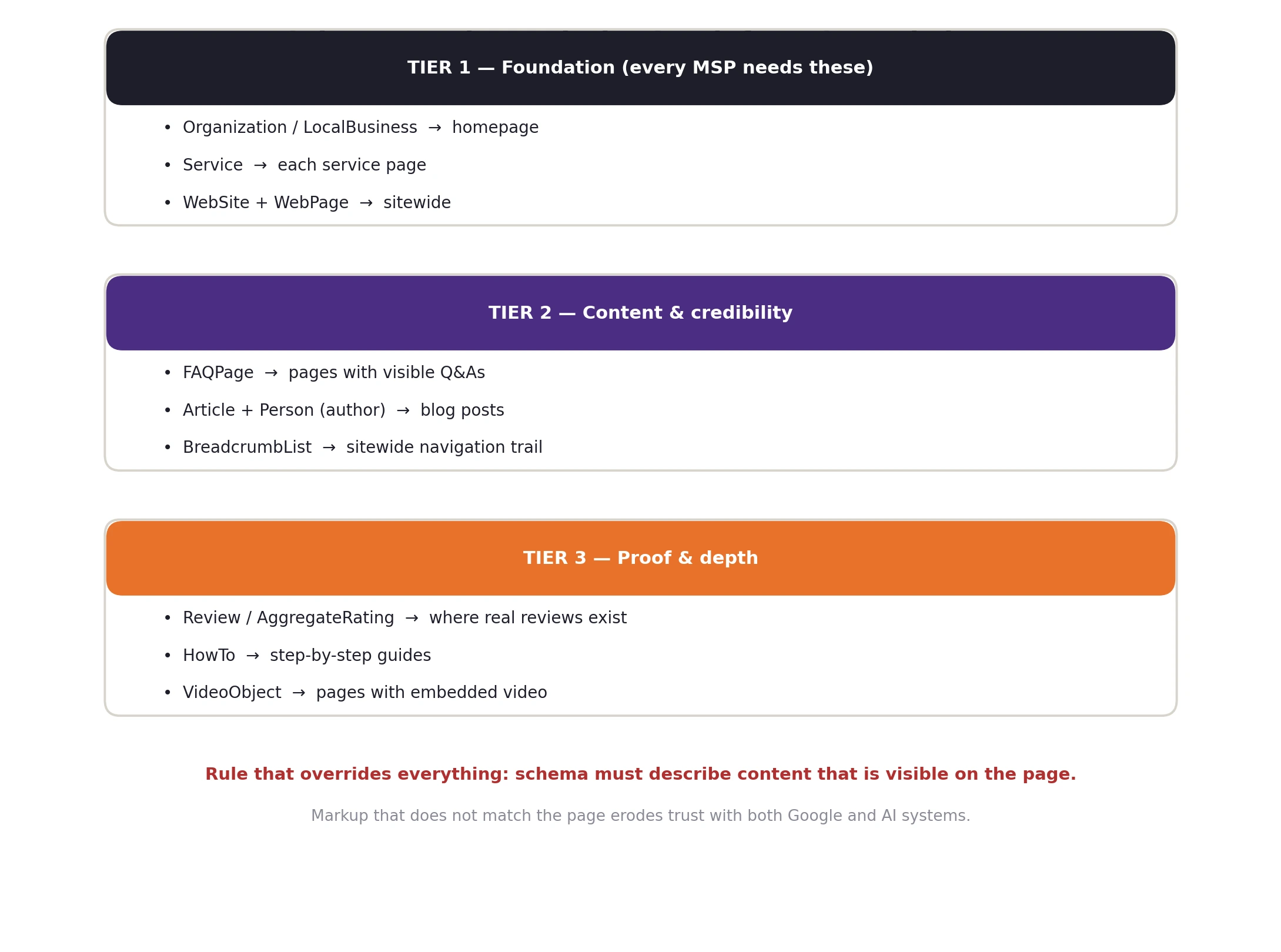
Tier 1: Foundation Schema Every MSP Website Needs
Organization / LocalBusiness schema (homepage)
This is your entity’s anchor. For an MSP serving a local or regional market, use LocalBusiness (or its subtype ProfessionalService); if you serve clients nationally with no local emphasis, Organization is fine. Follow Google’s LocalBusiness documentation for supported properties. A solid MSP implementation looks like this:
<script type="application/ld+json">{ "@context": "https://schema.org", "@type": "ProfessionalService", "@id": "https://www.yourmsp.com/#organization", "name": "Your MSP Name", "url": "https://www.yourmsp.com/", "logo": "https://www.yourmsp.com/images/logo.png", "image": "https://www.yourmsp.com/images/office.jpg", "description": "Managed IT services and cybersecurity for small and mid-sized businesses in Denver, Colorado.", "telephone": "+1-303-555-0100", "address": { "@type": "PostalAddress", "streetAddress": "123 Main St, Suite 200", "addressLocality": "Denver", "addressRegion": "CO", "postalCode": "80206", "addressCountry": "US" }, "areaServed": { "@type": "State", "name": "Colorado" }, "openingHours": "Mo-Fr 08:00-18:00", "sameAs": [ "https://www.linkedin.com/company/yourmsp", "https://www.facebook.com/yourmsp" ]}</script>Two properties deserve special attention. The @id gives your organization a stable identifier that every other schema block on your site can reference — the key to the connected graph covered below. And sameAs links your entity to your profiles elsewhere on the web, which is one of the strongest disambiguation signals you can send to both search engines and AI systems.
Service schema (each service page)
Each dedicated service page — managed IT, cybersecurity, cloud and backup — should carry a Service block naming that service, describing it, and pointing back to your organization as the provider:
{ "@context": "https://schema.org", "@type": "Service", "serviceType": "Managed IT Services", "name": "Managed IT Services", "description": "Proactive monitoring, help desk support, and IT management for businesses with 10-200 employees.", "provider": { "@id": "https://www.yourmsp.com/#organization" }, "areaServed": { "@type": "State", "name": "Colorado" }, "url": "https://www.yourmsp.com/services/managed-it-services/"}Notice the provider is a reference to the organization’s @id — not a copy of the whole organization block. That reference is what turns isolated tags into a graph.
WebSite and WebPage schema (sitewide)
A WebSite block on the homepage names your site and connects it to your organization as publisher. WebPage (or a specific subtype like AboutPage or ContactPage) on each page states what that page is. These are simple, low-effort blocks that complete the foundation and are typically handled automatically by good SEO plugins.
Tier 2: Content and Credibility Schema
FAQPage schema
MSP buyers ask predictable questions — pricing, response times, contracts, security. Publishing real FAQ sections on service pages and marking them up with FAQPage schema does double duty: it structures answers for search engines per Google’s FAQ documentation, and it gives AI systems clean question-and-answer pairs in exactly the format conversational search uses. The questions and answers must appear visibly on the page, word for word:
{ "@context": "https://schema.org", "@type": "FAQPage", "mainEntity": [{ "@type": "Question", "name": "How much do managed IT services cost?", "acceptedAnswer": { "@type": "Answer", "text": "Most businesses pay a flat monthly fee per user or per device, depending on the coverage level and the tools included. We provide fixed pricing after a short assessment." } }]}Article + Person schema (blog posts)
Every post on your blog should carry Article schema (see Google’s article guidance) with a real, named author marked up as a Person — including the author’s role and a link to their profile. Named authorship with credentials is a core part of demonstrating experience and expertise, and it gives AI systems a person-entity to associate your content with. Keep datePublished and dateModified accurate: stale or dishonest dates damage trust with every system that reads them.
BreadcrumbList schema
Breadcrumb markup mirrors your site architecture in code (per Google’s breadcrumb documentation) and can replace the raw URL in your search listings with a readable path. If your site architecture is clean, breadcrumbs are nearly free to implement — most platforms and SEO plugins generate them automatically.
Tier 3: Proof and Depth Schema
- Review / AggregateRating. Where you display genuine client reviews on your own pages, review markup can make you eligible for star ratings in search results. Follow Google’s review snippet rules carefully: reviews must be real, visible, and about the specific thing on the page — self-serving shortcuts here are a documented penalty area, and fake or unverifiable ratings will do far more harm than the stars are worth.
- HowTo. For genuinely step-by-step guides (e.g., “how to prepare for a cyber insurance audit”), HowTo markup structures each step machine-readably — useful content for AI extraction even where visual rich results are limited.
- VideoObject. If you embed explainer or testimonial videos, VideoObject markup makes them eligible for video search features and tells machines what each video covers.
Connect Everything: Build One Entity Graph, Not Isolated Tags
The most common gap between “has schema” and “benefits from schema” is connection. Many sites carry markup generated page by page, with no relationships between blocks. The stronger pattern — and the one that matters most for AI comprehension — is a connected graph: every block references the others through stable @id identifiers.
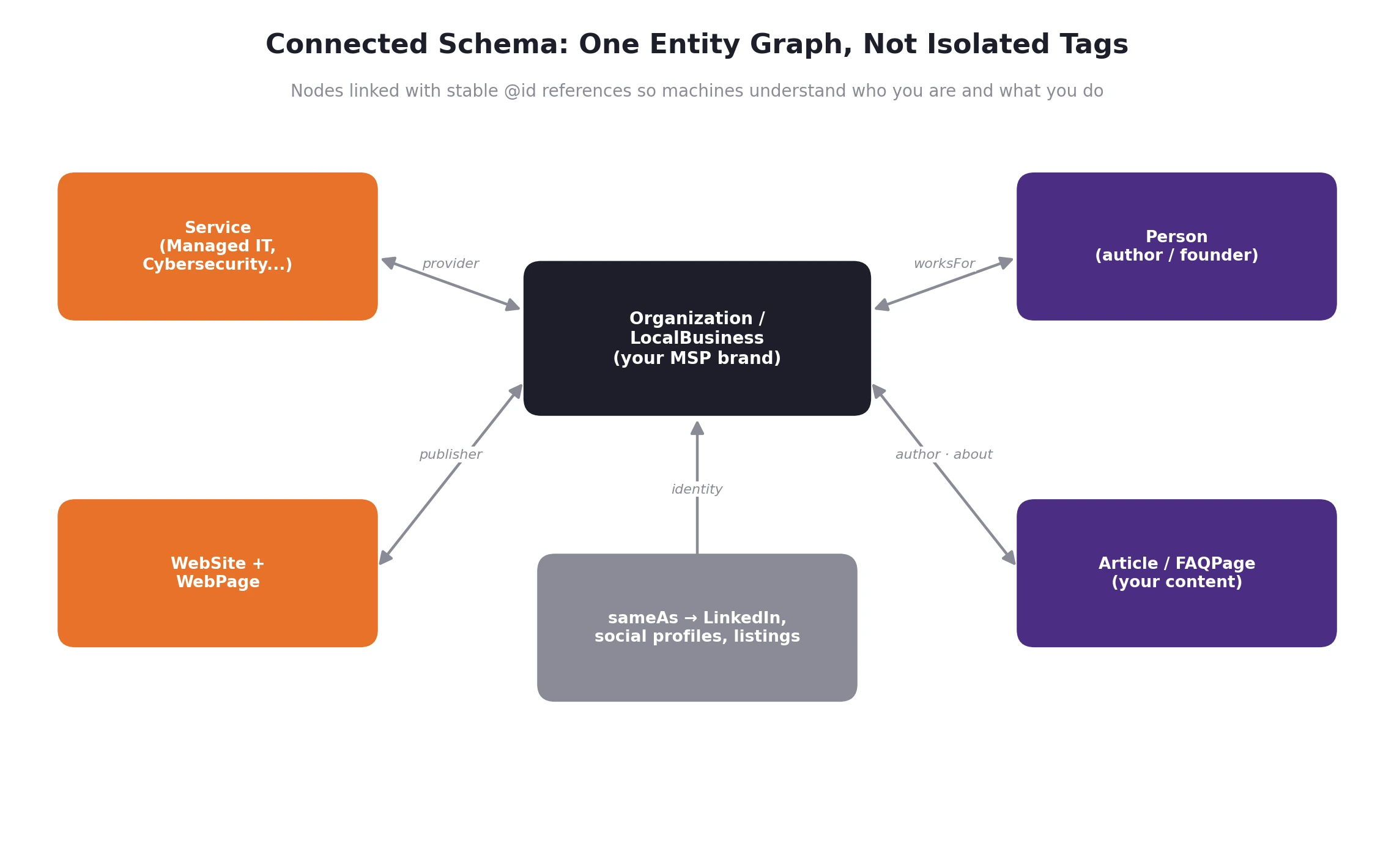
In practice, the graph means:
- Your Organization/LocalBusiness block declares one stable @id (e.g., yourdomain.com/#organization).
- Every Service block names that @id as its provider.
- Every Article names a Person as author, and that Person’s worksFor points to the organization @id.
- The WebSite block names the organization as publisher.
- sameAs ties the whole graph to your verified external profiles.
The result is a single, coherent machine-readable story: this organization exists, here is proof of its identity, these are its services, these people create its content, and this content belongs to it. That story is exactly what entity-based search and AI systems are built to consume.
How to Implement Schema on Your MSP Website
- SEO plugins (easiest). On WordPress and similar platforms, mainstream SEO plugins generate solid Organization, WebSite, Article, and breadcrumb markup automatically, with settings for your business details. This covers much of Tier 1 and 2 with minimal effort — but verify the output; defaults are generic and sometimes wrong for service businesses.
- Custom JSON-LD (most control). For Service blocks, connected @id graphs, and FAQ markup that exactly matches your page content, hand-written JSON-LD added to each page’s head is the reliable route. It’s a small amount of code that rarely needs to change.
- Site builders. Most modern site builders provide a per-page code-injection area where JSON-LD can be added directly — no plugin required.
Then validate — always:
- Run every page through Google’s Rich Results Test to check eligibility for enhanced results and catch required-property errors.
- Use the schema.org validator for general structural correctness beyond Google’s feature set.
- After launch, monitor the structured data reports in Google Search Console — they’ll flag errors and warnings as Google crawls the markup at scale.
7 Schema Mistakes That Quietly Break Your Results
- Marking up content that isn’t on the page. The cardinal sin — a policy violation that risks penalties and destroys machine trust.
- Schema drift. Markup written once and never updated while the page changes underneath it. Mismatched schema is worse than no schema. Review markup whenever you revise a page.
- Missing required properties. FAQPage without answers, LocalBusiness without an address, Review without a rating — incomplete blocks silently fail eligibility.
- Copy-paste markup from templates left with placeholder values or another business’s details.
- Wrong type for the content. Product schema on a service page, Article on a service description. Match the type to what the page actually is.
- Isolated blocks with no @id connections — technically valid, strategically wasted.
- Fake or self-created reviews in Review markup. A documented penalty area, and reputational poison if surfaced by AI tools.
How to Measure Whether Schema Is Working
- Search Console enhancement reports show valid items, errors, and which rich results your pages are winning.
- Click-through rate on pages that gained enhanced listings — compare CTR before and after in Search Console performance reports.
- Brand accuracy in AI tools. Periodically ask major AI assistants who your company is, what you do, and who the best MSPs in your area are. Watch whether descriptions become more accurate and whether you begin appearing — this is your AI-visibility baseline.
- Local pack and knowledge panel completeness for your brand searches.
Set expectations correctly: schema effects appear over weeks as pages are recrawled, and they compound with content quality and reputation rather than replacing them.
Conclusion: Make Your Expertise Machine-Readable
Search is splitting into two audiences: humans skimming results pages, and machines assembling answers. You already write for the first audience. Schema markup is how you write for the second — and right now, most MSPs simply don’t. That gap is your opportunity: a modest, one-time technical investment that makes every page you’ve published easier to rank, richer in search results, and legible to the AI systems your future clients are already asking for recommendations.
The playbook is straightforward: implement the foundation tier, mark up your real FAQs and articles, connect everything into one entity graph with @id references, validate it, and keep it synchronized with your content. Do it honestly — schema labels what’s true — and pair it with genuinely useful content and real reviews.
If you’d rather have specialists implement it — correctly, connected, and validated that’s exactly what our SEO team does for MSPs and IT companies, alongside building websites engineered to convert. Book an intro call with Tech Marketing Team and we’ll audit your current markup, show you what machines currently see when they read your site, and map the fastest path to full AI-ready visibility.
What is schema markup for MSP websites?
Schema markup is standardized code (usually JSON-LD) added to your web pages that explicitly labels your business, services, content, and reviews in a format search engines and AI systems can read with certainty. For MSPs, the core types are LocalBusiness or Organization, Service, FAQPage, Article, and BreadcrumbList.
Does schema markup improve Google rankings directly?
Schema is not a direct ranking factor by itself, but it improves rankings’ business value: it makes pages eligible for rich results that lift click-through rates, strengthens the local and entity signals that local rankings depend on, and helps Google understand and match your pages to the right searches more confidently.
Does schema markup help with AI search visibility?
Yes — most directly on Google’s AI-powered search surfaces, which use structured data to understand pages. Other AI assistants benefit indirectly: schema clarifies your entity identity, supports the strong organic rankings AI tools draw from, and structures your content into the clean question-and-answer blocks conversational AI prefers to cite.
Which schema type should an MSP implement first?
Start with LocalBusiness (or ProfessionalService) on your homepage, including address, service area, and sameAs links to your profiles. Then add Service schema to each service page referencing your organization’s @id, followed by FAQPage on pages with visible Q&A sections.
What is JSON-LD and why is it recommended?
JSON-LD is a script-based structured data format placed in a page’s head section that describes the page without altering visible content. Google recommends it because it’s easier to implement, maintain, and validate than older inline formats, and it’s the standard format across modern SEO tooling.
Can schema markup hurt my MSP website?
Only when misused. Markup that describes content not visible on the page, fake reviews, or spammy self-serving structured data violates Google’s policies and can trigger manual actions. Honest markup that mirrors real page content carries essentially no downside.
Do I need a developer to add schema markup?
Not necessarily. SEO plugins handle the basics automatically, and most website platforms let you paste JSON-LD into a per-page code injection field. For a connected entity graph with @id references across the whole site, experienced help is worth it — the implementation is small but precision matters.
How long does it take to see results from schema markup?
Rich result eligibility can appear within days to weeks as Google recrawls your pages; entity and AI-visibility effects build over one to three months as the markup, your content, and your web presence reinforce each other. Validate immediately, then measure through Search Console over the following weeks.