



For two years, anyone doing SEO for a managed service provider had to answer an awkward question: are we showing up in AI answers? The honest response was that nobody could tell you. AI Overview and AI Mode impressions were folded into Search Console’s standard performance data with no way to separate them out.
That changed on 3 June 2026, when Google launched dedicated Search Generative AI performance reports in Search Console. For the first time, MSPs can see how often their pages appear inside Google’s AI features, broken out from ordinary organic results.
It is a genuine step forward. It is also considerably narrower than the reaction to it suggested, and understanding exactly where the boundaries sit is the difference between reporting something useful and reporting something misleading to your leadership team or your clients.
This guide covers what the new report shows and what it deliberately does not, how to configure Search Console and GA4 for an MSP specifically, how to track visitors arriving from AI assistants outside Google, and how to build a measurement stack that connects search visibility to booked calls rather than to vanity metrics.
The problem with how most MSPs measure SEO
Before the tooling, a word about the framing, because most MSP SEO reports measure the wrong thing well.
An MSP does not need traffic. It needs perhaps five to fifteen qualified conversations a month with businesses in its service area and size range. A report showing organic sessions up 40 percent tells leadership almost nothing about whether that happened. Worse, it can conceal a decline: traffic rising because a blog post attracted students and job seekers, while enquiries from the four cities you actually serve fell.
This matters more now than it did, because AI features have changed the shape of organic traffic across the board. Informational queries increasingly get answered on the results page. Sessions can fall while commercial visibility rises. If your measurement framework treats sessions as the headline number, you will misread that situation completely, and quite possibly cut the work that is producing your pipeline.
The reframe: measure whether the right people can find you and are contacting you. Traffic is a diagnostic input, not an outcome. For an MSP, the outcome is a booked call with a qualified business.
Layer 1: Search Console, visibility including AI
Search Console is the only source of truth about how Google itself sees your site. For MSPs, four areas matter.
The Generative AI performance report
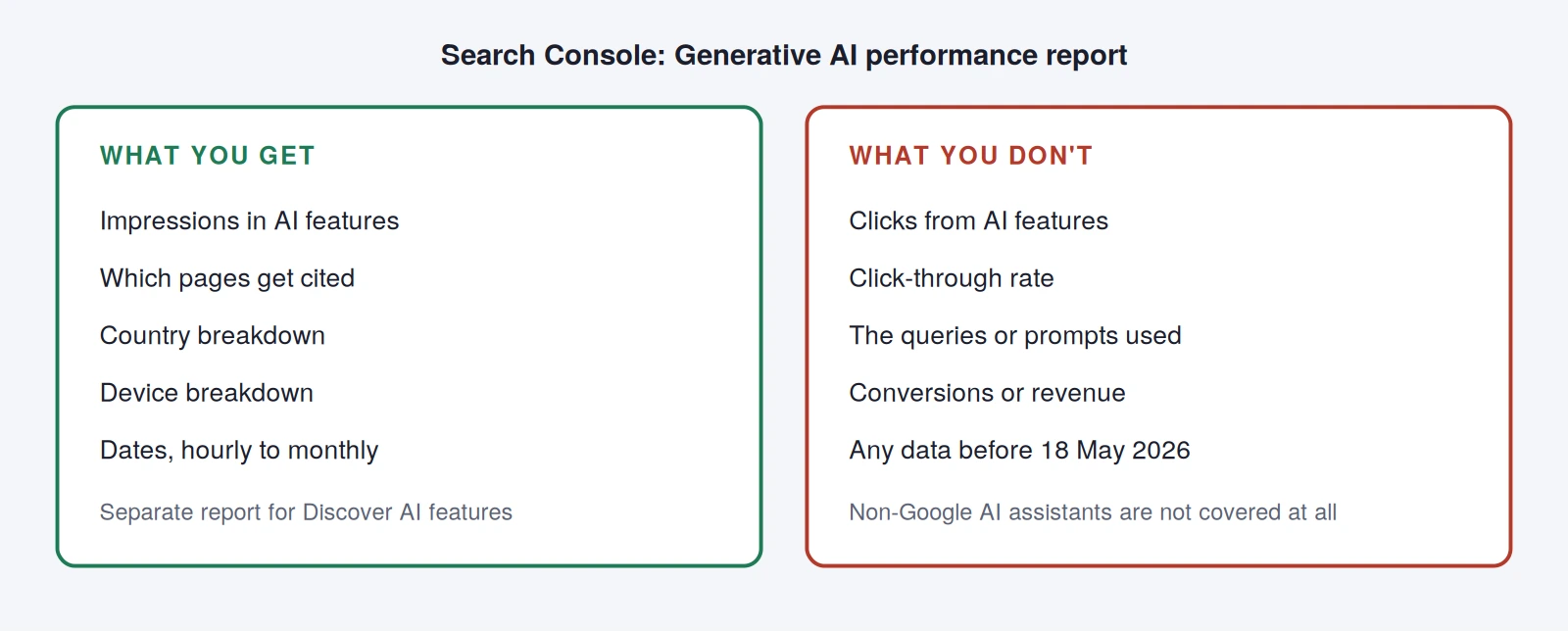
Found under Performance, this report isolates impressions from Google’s generative AI features: AI Overviews and AI Mode in Search, plus generative AI features in Discover, which are reported separately.
What it gives you: impressions, broken down by page, country, device and date, with granularity from hourly through to monthly. In practice, the page-level breakdown is the valuable part: it tells you precisely which of your URLs are being cited as sources inside AI answers.
What it does not give you: clicks, click-through rate, query data, or conversions. That is a significant limitation and it needs stating plainly in any report you produce. You can see that you appeared. You cannot see whether anyone came, or what they were asking.
Three further points that are easy to get wrong:
- This is a breakout, not new data. These impressions were always included in your overall Search performance totals and remain there. Your aggregate numbers do not change. Do not add the two together: you will double-count.
- Data starts from 18 May 2026 with no historical backfill. There is no way to establish a baseline before that date.
- If the report is not visible, that has meaning. Google documents three possible reasons: your property is not yet in the rollout, your site has not received enough AI impressions, or the site has been excluded from Search generative AI features. That last one is worth checking today, because the same announcement introduced a control allowing sites to block their content from AI features without affecting ordinary organic rankings, and it is entirely possible to have this set without knowing.
Google’s own announcement of the generative AI performance reports and its guide to optimising for generative AI search are both worth reading in full.
The standard performance report, filtered for an MSP
Your default view should never be site-wide totals. Build these saved filters:
- Commercial pages only. Filter page URL by your services and location paths. This is your money view.
- Branded versus non-branded. Search Console now has a built-in branded queries filter. Branded growth means your other marketing is working; non-branded growth means your SEO is.
- Geographic queries. Filter queries containing your city names to see whether local visibility is actually moving.
- Position bands. Pages in positions 5 to 15 on commercial queries are your highest-return optimisation targets.
Indexing and technical health
Check the Pages report monthly for commercial URLs that have dropped out of the index, and this happens more often than MSPs realise, particularly with location pages. And check crawl stats if you have made firewall or bot-management changes. MSPs run tighter security on their own websites than most businesses, and over-aggressive rules blocking legitimate crawlers is one of the most common causes of unexplained visibility loss in this industry.
Layer 2: GA4, behaviour and leads
Search Console tells you about visibility. GA4 tells you what happened next. Most MSP GA4 properties are effectively unconfigured, which is why so many MSP reports fall back on sessions.
Set up key events properly
GA4 replaced the “conversion” terminology with key events, events you flag as most important to the business. For an MSP, configure at minimum:
| Key event | What it captures | Why it matters |
|---|---|---|
| generate_lead | Contact form submission | Primary conversion |
| book_call | Booking widget completion | The highest-value action on most MSP sites |
| phone_click | Click on a tel: link | Often the majority of mobile leads, and routinely untracked |
| email_click | Click on a mailto: link | Common for B2B buyers who dislike forms |
| guide_download | Gated asset download | Mid-funnel signal |
| pricing_view | Scroll or view of pricing section | Strong intent indicator |
Two warnings. Do not mark generic events like page_view as key events, always add conditions so you are measuring a specific interaction. And phone click tracking is the single most common omission we find in MSP analytics: an MSP can be generating most of its leads by phone and reporting a conversion rate near zero because nobody instrumented the tel: links.
Separate the reports you need from the reports GA4 gives you
Two explorations are worth building once and reusing:
- Landing page by key event. Dimension: landing page. Metrics: sessions, key events, session key event rate. This tells you which pages actually produce enquiries, which is almost never the pages with the most traffic.
- Channel by key event, segmented to your service area. Add a geographic filter for the cities you serve. National traffic from outside your footprint is noise, and for many MSPs it is the majority of their sessions.
That geographic segment is transformative for an MSP. Once applied, the picture usually inverts: the blog post with 3,000 monthly visits contributes almost nothing, while a location page with 90 visits produces most of the enquiries.
Connect Search Console to GA4
Link the two properties so you can see landing pages alongside the queries that led to them. Google publishes guidance on using Search Console and Analytics data together, and the key point to keep in mind is that the two will never match exactly. They measure different things at different points: Search Console counts what happened in search results, GA4 counts what happened on your site after script execution and consent. Small discrepancies are normal. Explaining that once, up front, prevents a recurring argument.
Layer 3: Tracking AI assistant traffic outside Google
The Search Console report covers Google’s AI features only. It says nothing about visitors arriving from other AI assistants, and for MSPs that is a growing share of high-intent traffic, because business owners increasingly ask an assistant to shortlist providers before they search.
You can see this traffic in GA4 today, with a little setup.
Assistants that send users to your site typically pass a referrer. In GA4, build an exploration using session source / medium and look for the AI assistant domains sending you traffic. Create a custom channel group that captures them together so you can report on the segment as a whole rather than as scattered referral lines.
Two things to expect. First, the volume will look small, often 1 to 4 percent of sessions. Second, the behaviour will look excellent: high engagement, high conversion rate, low bounce. That combination is typical, because someone arriving from an AI recommendation has already been pre-qualified by the assistant. Judge this channel on conversion rate, not volume.
Be sceptical of AI visibility tools
A large market has appeared selling “AI visibility scores” and “LLM rank tracking.” Some are useful for directional monitoring of whether your brand gets mentioned for a given prompt. None have access to Google’s internal ranking or AI systems, and Google says so explicitly in its optimisation guidance: be wary of third-party tools promising ranking success or claiming to use internal Google metrics. Treat any score they produce as one vendor’s estimate, never as a metric to report as fact to a client or a board.
Layer 4: Connect it to pipeline
Everything above still stops at the website. The measurement that changes decisions goes one step further.
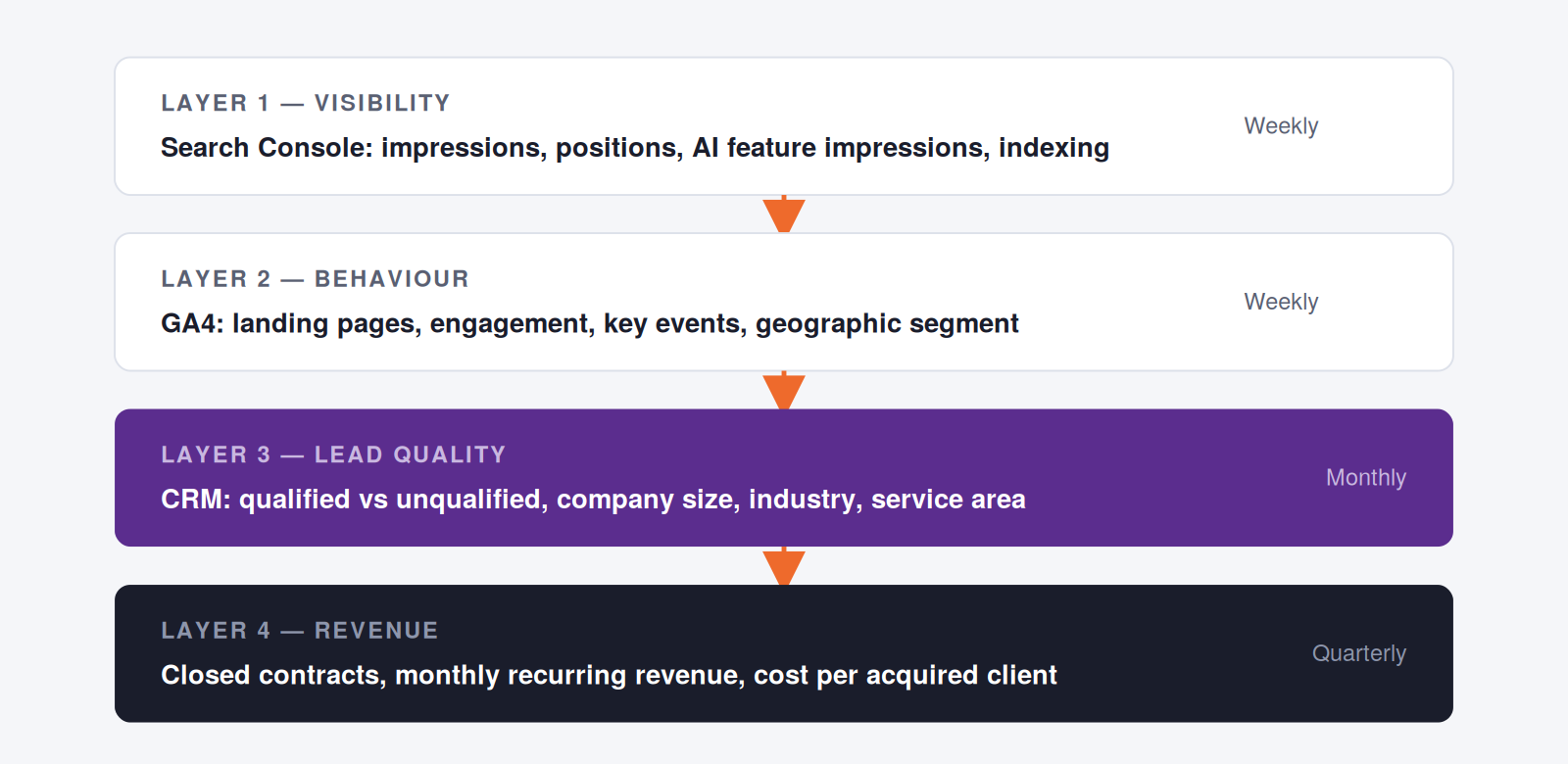
The practical mechanism is simple and rarely implemented: capture the landing page and source on every enquiry form as hidden fields, pass them into your CRM, and review monthly with whoever qualifies leads. Two questions are enough: which pages produced enquiries, and were those enquiries any good?
MSPs who do this consistently discover the same thing: a small number of pages produce nearly all the qualified pipeline, and they are usually not the pages with the highest traffic. That finding redirects the entire content and SEO budget, and it is invisible from GA4 alone.
What to actually report, and how often
| Cadence | What you look at | What you are deciding |
|---|---|---|
| Weekly | Indexing errors, sudden ranking or impression drops, form failures | Is anything broken? |
| Monthly | Non-branded impressions and clicks on commercial pages, key events by landing page, lead quality review, AI feature impressions by page | Is this working, and where? |
| Quarterly | Closed clients from organic, cost per acquired client, competitive position on priority terms, content performance by buyer stage | Should we change strategy? |
Set expectations on timeframe alongside this. Meaningful movement on competitive MSP terms typically takes six to twelve months, with earlier wins on lower-competition, high-intent queries. A monthly report is for detecting problems and confirming direction, not for judging whether the strategy works.
Three mistakes worth naming
Reporting AI impressions as if they were traffic. The report contains no click data. Presenting impression growth as a traffic or revenue outcome will eventually be checked, and the credibility loss is not worth it.
Double-counting. AI feature impressions remain inside your overall Search performance totals. They are a breakout, not an addition.
Treating a session decline as failure without checking composition. If informational sessions fall while enquiries from your service area hold or rise, that is a healthier business, not a worse one. Segment before you conclude.
For context on how the search landscape shifted underneath these metrics, see MSP SEO in 2026: what still works after AI Overviews. To improve the visibility you are now measuring, how to get your MSP mentioned in ChatGPT and AI search results covers the levers, and AI in MSP marketing: game-changer or overhyped? takes the sceptical view of the wider category.
Where this leaves you
The measurement question for MSPs has genuinely improved. You can now see, page by page, whether Google’s AI features are citing you, something that was pure guesswork a few months ago.
What has not changed is the discipline underneath it. Visibility is an input. The number that decides whether your marketing is working is how many qualified businesses in your service area had a conversation with you this month, and which pages sent them. Build the stack so that number is always visible, treat everything above it as diagnostics, and you will make better decisions than any dashboard alone can produce.
Want measurement that connects to booked calls?
We set up Search Console, GA4 and CRM tracking for IT providers and MSPs so you can see which pages produce qualified enquiries, not just which produce traffic.
Book a free strategy call or see how our MSP SEO programme reports on results.
Can you track AI Overviews traffic in Google Search Console?
You can track impressions but not clicks. Google launched dedicated Search Generative AI performance reports in Search Console on 3 June 2026, showing how often your URLs appear in AI Overviews, AI Mode and generative AI features in Discover, broken down by page, country, device and date. Click data, click-through rate and query information are not included in the current version. Data begins from 18 May 2026 with no historical backfill.
Why can't I see the Generative AI report in my Search Console?
Google documents three reasons. Your property may not yet be included in the rollout, which began with a subset of sites. Your site may not have received enough impressions in AI features to populate the report. Or your site may have been excluded from Search generative AI features using the control introduced alongside the report. The third possibility is worth checking, since it can be set without the site owner realising.
Do AI Overview impressions get added to my normal Search Console numbers?
No, they were always included and remain included in your overall Search performance totals. The generative AI report is a breakout view of data that was already there, not a new stream to be added on top. Adding the two figures together will double-count your visibility.
What are key events in GA4 and which ones should an MSP set up?
Key events are the GA4 replacement for conversions: existing events that you flag as most important to the business. An MSP should configure form submissions, booking widget completions, phone number clicks, email address clicks, gated asset downloads and pricing section views. Phone click tracking is the most commonly missed, and its absence can make an MSP that generates most of its leads by phone appear to convert almost nobody.
How do I track traffic from ChatGPT and other AI assistants in GA4?
Assistants that send users to your website generally pass a referrer, so the traffic appears in GA4 under session source and medium. Build an exploration filtered to those referring domains, or create a custom channel group so the segment can be reported as a whole. Expect low volume and unusually high engagement and conversion rates, because these visitors have been pre-qualified before arriving. Judge the channel on quality, not size.
Why don't Search Console and GA4 numbers match?
They measure different things at different points. Search Console records what happened in Google’s search results (impressions and clicks) while GA4 records sessions on your site after tracking scripts have loaded and consent has been given. Ad blockers, consent choices, bounce-before-load and different attribution windows all create legitimate gaps. Small discrepancies are expected and are not a sign of a tracking fault.
Are AI visibility tracking tools worth paying for?
They can be useful for directional monitoring of whether your brand appears for particular prompts, but no third-party tool has access to Google’s internal ranking or AI systems. Google states this directly and advises caution with tools claiming to use internal metrics. Use them as one input if they suit your workflow, and never present their scores to a client or a board as an authoritative measurement.
How long before SEO results show up for an MSP?
Six to twelve months for meaningful movement on competitive terms in a mid-size metro, with earlier wins on lower-competition, high-intent queries and on technical fixes that unlock existing pages. The first signals to watch are impression growth on non-branded commercial queries and position improvements from page two to page one, both of which typically appear before traffic or enquiries change measurably.
What SEO metrics should an MSP actually report to leadership?
Qualified enquiries from the service area, which pages produced them, cost per acquired client, and non-branded visibility on commercial terms. Sessions, keyword counts and third-party authority scores belong in the diagnostic appendix, not the headline. The question leadership is asking is whether the right businesses are finding and contacting you, so report against that directly.